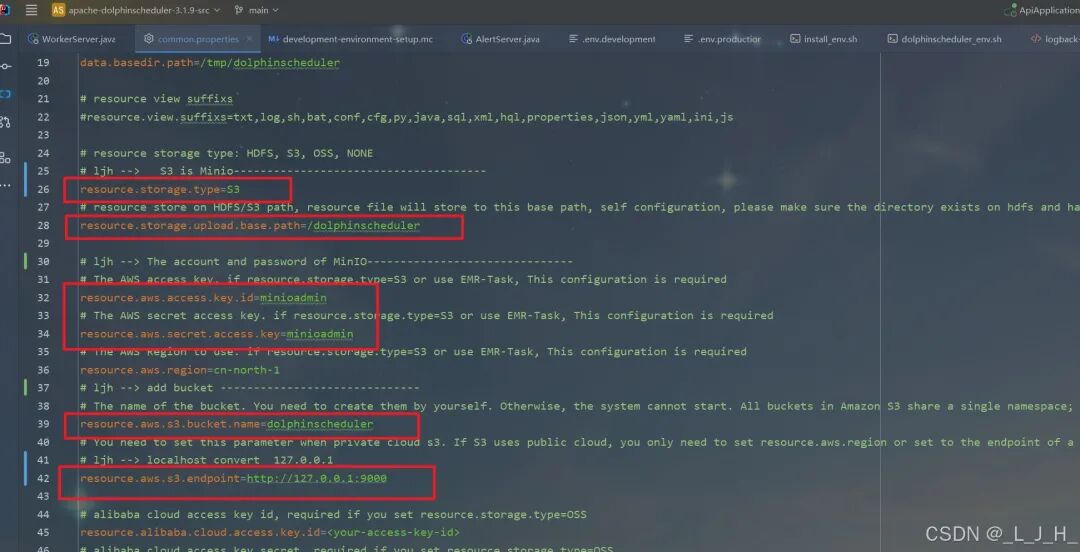
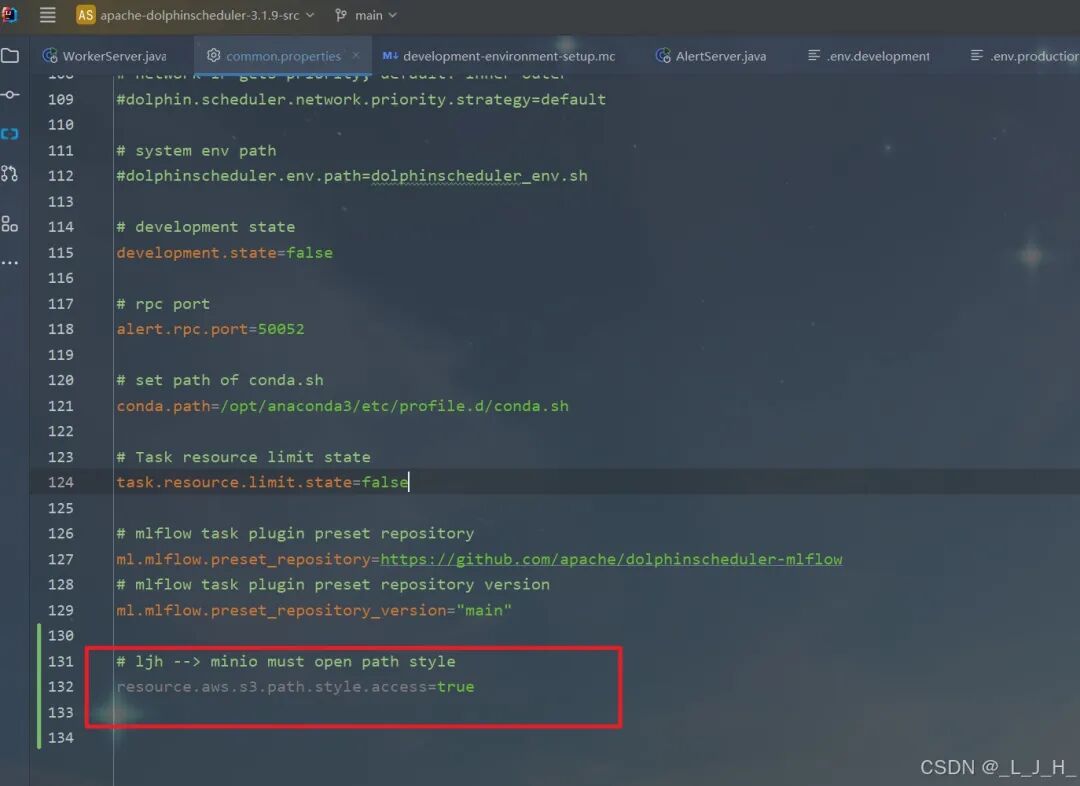
# Licensed to the Apache Software Foundation (ASF) under one or more# contributor license agreements. See the NOTICE file distributed with# this work for additional information regarding copyright ownership.# The ASF licenses this file to You under the Apache License, Version 2.0# (the "License"); you may not use this file except in compliance with# the License. You may obtain a copy of the License at## http://www.apache.org/licenses/LICENSE-2.0## Unless required by applicable law or agreed to in writing, software# distributed under the License is distributed on an "AS IS" BASIS,# WITHOUT WARRANTIES OR CONDITIONS OF ANY KIND, either express or implied.# See the License for the specific language governing permissions and# limitations under the License.## user data local directory path, please make sure the directory exists and have read write permissionsdata.basedir.path=/tmp/dolphinscheduler# resource view suffixs#resource.view.suffixs=txt,log,sh,bat,conf,cfg,py,java,sql,xml,hql,properties,json,yml,yaml,ini,js# resource storage type: HDFS, S3, OSS, NONE# ljh --> S3 is Minio--------------------------------------resource.storage.type=S3# resource store on HDFS/S3 path, resource file will store to this base path, self configuration, please make sure the directory exists on hdfs and have read write permissions. "/dolphinscheduler" is recommendedresource.storage.upload.base.path=/dolphinscheduler# ljh --> The account and password of MinIO-------------------------------# The AWS access key. if resource.storage.type=S3 or use EMR-Task, This configuration is requiredresource.aws.access.key.id=minioadmin# The AWS secret access key. if resource.storage.type=S3 or use EMR-Task, This configuration is requiredresource.aws.secret.access.key=minioadmin# The AWS Region to use. if resource.storage.type=S3 or use EMR-Task, This configuration is requiredresource.aws.region=cn-north-1# ljh --> add bucket ------------------------------# The name of the bucket. You need to create them by yourself. Otherwise, the system cannot start. All buckets in Amazon S3 share a single namespace; ensure the bucket is given a unique name.resource.aws.s3.bucket.name=dolphinscheduler# You need to set this parameter when private cloud s3. If S3 uses public cloud, you only need to set resource.aws.region or set to the endpoint of a public cloud such as S3.cn-north-1.amazonaws.com.cn# ljh --> localhost convert 127.0.0.1resource.aws.s3.endpoint=http://127.0.0.1:9000# alibaba cloud access key id, required if you set resource.storage.type=OSSresource.alibaba.cloud.access.key.id=<your-access-key-id># alibaba cloud access key secret, required if you set resource.storage.type=OSSresource.alibaba.cloud.access.key.secret=<your-access-key-secret># alibaba cloud region, required if you set resource.storage.type=OSSresource.alibaba.cloud.region=cn-hangzhou# oss bucket name, required if you set resource.storage.type=OSSresource.alibaba.cloud.oss.bucket.name=dolphinscheduler# oss bucket endpoint, required if you set resource.storage.type=OSSresource.alibaba.cloud.oss.endpoint=https://oss-cn-hangzhou.aliyuncs.com# if resource.storage.type=HDFS, the user must have the permission to create directories under the HDFS root pathresource.hdfs.root.user=hdfs# if resource.storage.type=S3, the value like: s3a://dolphinscheduler; if resource.storage.type=HDFS and namenode HA is enabled, you need to copy core-site.xml and hdfs-site.xml to conf dirresource.hdfs.fs.defaultFS=hdfs://mycluster:8020# whether to startup kerberoshadoop.security.authentication.startup.state=false# java.security.krb5.conf pathjava.security.krb5.conf.path=/opt/krb5.conf# login user from keytab usernamelogin.user.keytab.username=hdfs-mycluster@ESZ.COM# login user from keytab pathlogin.user.keytab.path=/opt/hdfs.headless.keytab# kerberos expire time, the unit is hourkerberos.expire.time=2# resourcemanager port, the default value is 8088 if not specifiedresource.manager.httpaddress.port=8088# if resourcemanager HA is enabled, please set the HA IPs; if resourcemanager is single, keep this value emptyyarn.resourcemanager.ha.rm.ids=192.168.xx.xx,192.168.xx.xx# if resourcemanager HA is enabled or not use resourcemanager, please keep the default value; If resourcemanager is single, you only need to replace ds1 to actual resourcemanager hostnameyarn.application.status.address=http://ds1:%s/ws/v1/cluster/apps/%s# job history status url when application number threshold is reached(default 10000, maybe it was set to 1000)yarn.job.history.status.address=http://ds1:19888/ws/v1/history/mapreduce/jobs/%s# datasource encryption enabledatasource.encryption.enable=false# datasource encryption saltdatasource.encryption.salt=!@#$%^&*# data quality optiondata-quality.jar.name=dolphinscheduler-data-quality-dev-SNAPSHOT.jar#data-quality.error.output.path=/tmp/data-quality-error-data# Network IP gets priority, default inner outer# Whether hive SQL is executed in the same sessionsupport.hive.oneSession=false# use sudo or not, if set true, executing user is tenant user and deploy user needs sudo permissions; if set false, executing user is the deploy user and doesn't need sudo permissionssudo.enable=truesetTaskDirToTenant.enable=false# network interface preferred like eth0, default: empty#dolphin.scheduler.network.interface.preferred=# network IP gets priority, default: inner outer#dolphin.scheduler.network.priority.strategy=default# system env path#dolphinscheduler.env.path=dolphinscheduler_env.sh# development statedevelopment.state=false# rpc portalert.rpc.port=50052# set path of conda.shconda.path=/opt/anaconda3/etc/profile.d/conda.sh# Task resource limit statetask.resource.limit.state=false# mlflow task plugin preset repositoryml.mlflow.preset_repository=https://github.com/apache/dolphinscheduler-mlflow# mlflow task plugin preset repository versionml.mlflow.preset_repository_version="main"# ljh --> minio must open path styleresource.aws.s3.path.style.access=true