解码 DolphinScheduler:Flink 任务如何 “跑” 起来?

在对接Dolphinscheduler到公司系统的过程中,想了解Flink任务是如何被调度起来的,于是在本地进行了一些调试,本文做了一些说明。


点击蓝字 关注我们


作者 | leo的小跟班

在对接Apache DolphinScheduler到公司系统的过程中,想了解一下Flink任务是如何被调度起来的,于是在本地进行了一些调试,本文会进行一些说明。

启动

DolphinScheduler

对于Dolphinscheduler的启动,这里直接选择了本地启动。运行dolphinscheduler-standalone-server模块中的StandaloneServer即可。

因为需要运行Flink任务,因此做了如下配置:

  1. 资源相关的配置:这里配置了HDFS相关的地址,因为需要在本地启动好HDFS。
./sbin/start-dfs.sh# resource storage type: HDFS, S3, NONEresource.storage.type=HDFS# resource store on HDFS/S3 path, resource file will store to this hadoop hdfs path, self configuration, please make sure the directory exists on hdfs and have read write permissions. "/dolphinscheduler" is recommendedresource.storage.upload.base.path=/dolphinscheduler# whether to startup kerberoshadoop.security.authentication.startup.state=false# resource view suffixs#resource.view.suffixs=txt,log,sh,bat,conf,cfg,py,java,sql,xml,hql,properties,json,yml,yaml,ini,js# if resource.storage.type=HDFS, the user must have the permission to create directories under the HDFS root pathresource.hdfs.root.user=lizu# if resource.storage.type=S3, the value like: s3a://dolphinscheduler; if resource.storage.type=HDFS and namenode HA is enabled, you need to copy core-site.xml and hdfs-site.xml to conf dirresource.hdfs.fs.defaultFS=hdfs://0.0.0.0:9000# use sudo or not, if set true, executing user is tenant user and deploy user needs sudo permissions; if set false, executing user is the deploy user and doesn't need sudo permissionssudo.enable=true
  1. 环境变量相关:直接配置的本机的环境变量信息,Dolphinscheduler在运行的时候会判断
resources目录下是否有环境变量文件,存在就会执行source环境变量的命令。
# JAVA_HOME, will use it to start DolphinScheduler serverexport JAVA_HOME=/Library/Java/JavaVirtualMachines/jdk1.8.0_281.jdk/Contents/Homeexport PATH=$PATH:$JAVA_HOME/binexport M2_HOME=/Users/lizu/app/apache-maven-3.6.3export PATH=$PATH:$M2_HOME/binexport SCALA_HOME=/Users/lizu/app/scala-2.11.12#export SCALA_HOME=/Users/lizu/app/scala-2.12.13export PATH=$PATH:$SCALA_HOME/bin#export SPARK_HOME=/Users/lizu/app/spark-2.4.3-bin-hadoop2.7export SPARK_HOME=/Users/lizu/app/spark-3.0.2-bin-hadoop2.7export PATH=$PATH:$SPARK_HOME/binexport FLINK_HOME=/Users/lizu/app/flink-1.13.6export PATH=$PATH:$FLINK_HOME/binexport PATH=/Library/Frameworks/Python.framework/Versions/3.6/bin:$PATHexport HADOOP_HOME=/Users/lizu/app/hadoop-2.7.6export PATH=$PATH:$HADOOP_HOME/bin#export HIVE_HOME=/Users/lizu/app/apache-hive-1.2.1-binexport HIVE_HOME=/Users/lizu/app/hive-2.3.4export PATH=$PATH:$HIVE_HOME/bin#export NODE_HOME=/Users/lizu/app/node-v14.16.0export NODE_HOME=/Users/lizu/app/node-v16.17.0export PATH=$PATH:$NODE_HOME/binexport PATH=$PATH:/Users/lizu/app/go/binexport PATH=$PATH:/Users/lizu/app/gradle-6.3/binalias python="/usr/local/bin/python3"export PYTHONPATH=$SPARK_HOME/python:$SPARK_HOME/python/pyspark:$SPARK_HOME/python/lib/py4j-0.10.9-src.zip:$PYTHONPATH

然后启动前端就可以访问了,地址如下:http://127.0.0.1:5173/

Flink

任务配置

启动local集群

因为要运行Flink任务,因此需要提前准备好Flink的环境,这里选择了local模型,直接在本地进行启动。

./start-cluster.sh

启动完成后就可以看到Flink的web页面了。

然后就可以去Dolphinscheduler配置Flink任务了。配置Flink任务主要分了如下几个步骤:

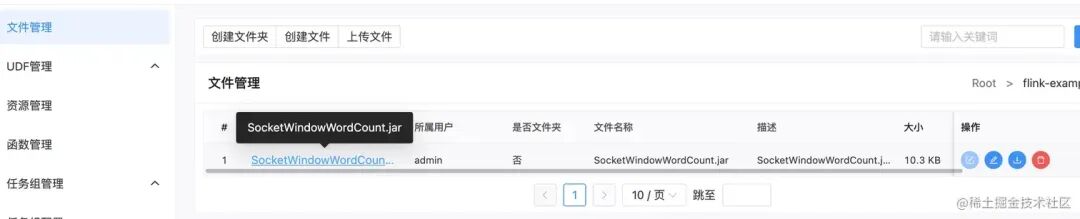
  1. 上传资源文件:可以直接选择官方example中的
SocketWindowWordCount.jar
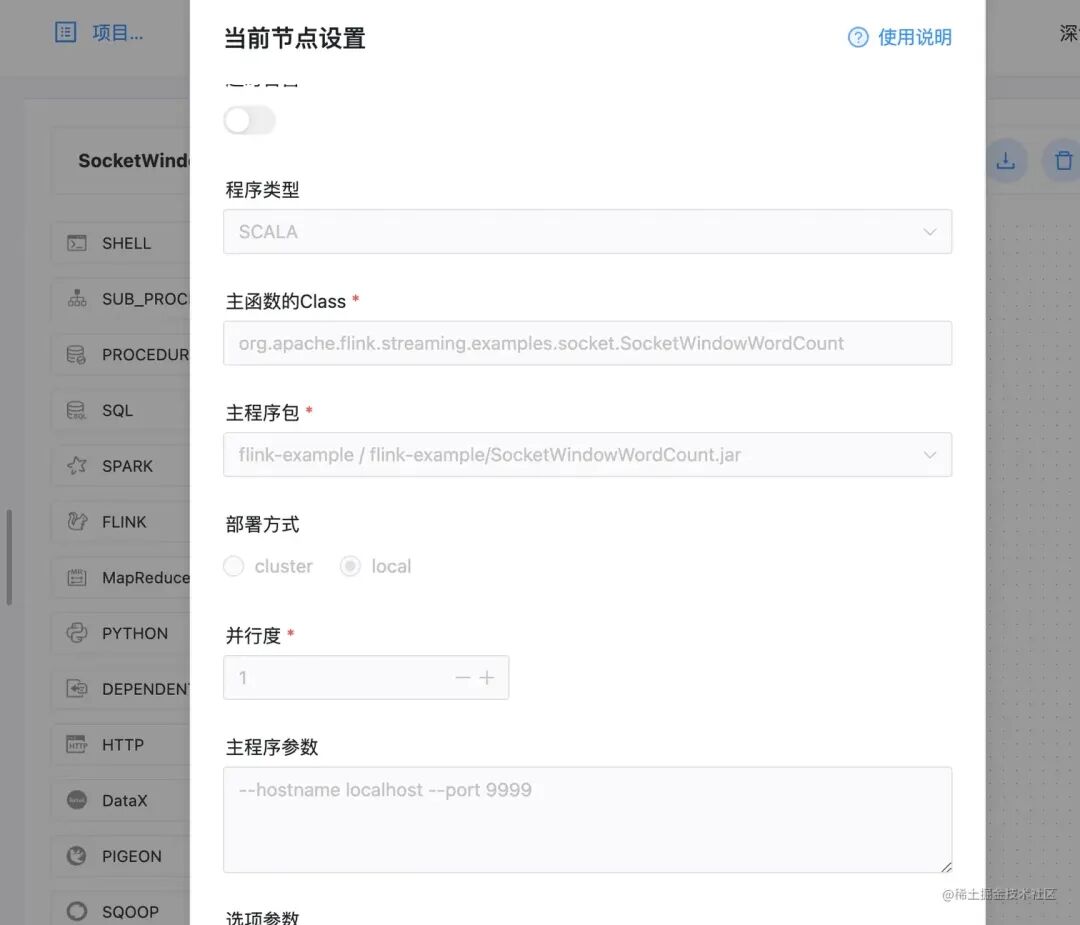
  1. 配置工作流:这里主要配置主函数以及前面上传的资源,因为
SocketWindowWordCount运行需要参数,这里在主程序参数中设置了其入参。
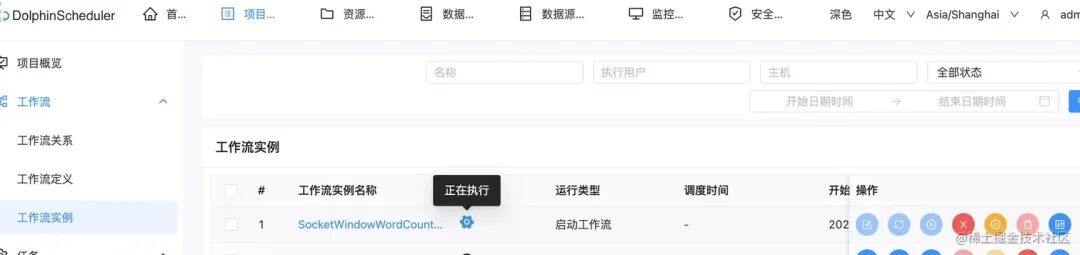
  1. 启动运行:最后可以启动进行测试,需要首先开启socket端口。
nc -l 9999

通过页面就可以看到Flink任务在执行中了。

Flink任务运行

相关源码

通过上面的内容,已经将Flink任务在Dolphinscheduler中运行了起来,最后来通过源码看看任务运行的一些细节吧。

在Dolphinscheduler中,任务是通过Master分配到Worker中进行运行的,并且任务运行的状态也会实时的通知到Master。两者之间的交互是通过netty实现的。

worker节点对任务的接收

worker启动后,会启动rpc的服务端和客户端,以及一个workerManagerThread用于从队列中获取需要执行的任务。

@PostConstructpublic void run() {    this.workerRpcServer.start();    this.workerRpcClient.start();    this.taskPluginManager.loadPlugin();    this.workerRegistryClient.setRegistryStoppable(this);    this.workerRegistryClient.start();    this.workerManagerThread.start();    this.messageRetryRunner.start();    /*     * registry hooks, which are called before the process exits     */    Runtime.getRuntime().addShutdownHook(new Thread(() -> {        if (!ServerLifeCycleManager.isStopped()) {            close("WorkerServer shutdown hook");        }    }));}

WorkerRpcServer中注册了很多处理器,暂时只关注这一个吧TaskDispatchProcessor

this.nettyRemotingServer.registerProcessor(CommandType.TASK_DISPATCH_REQUEST, taskDispatchProcessor);

TaskDispatchProcessor会接收从Master发送的task dispatch消息,并加入到worker任务队列waitSubmitQueue中。

final String workflowMasterAddress = taskDispatchCommand.getMessageSenderAddress();logger.info("Receive task dispatch request, command: {}", taskDispatchCommand);//....忽略部分代码	WorkerDelayTaskExecuteRunnable workerTaskExecuteRunnable = WorkerTaskExecuteRunnableFactoryBuilder      .createWorkerDelayTaskExecuteRunnableFactory(                taskExecutionContext,                workerConfig,                workflowMasterAddress,                workerMessageSender,                alertClientService,                taskPluginManager,                storageOperate)      .createWorkerTaskExecuteRunnable();// submit task to managerboolean offer = workerManager.offer(workerTaskExecuteRunnable);if (!offer) {    logger.warn("submit task to wait queue error, queue is full, current queue size is {}, will send a task reject message to master", workerManager.getWaitSubmitQueueSize());    workerMessageSender.sendMessageWithRetry(taskExecutionContext, workflowMasterAddress, CommandType.TASK_REJECT);else {    logger.info("Submit task to wait queue success, current queue size is {}", workerManager.getWaitSubmitQueueSize());}

WorkerTaskExecuteRunnable执行任务

WorkerManagerThread线程会不断的从worker任务队列waitSubmitQueue中获取到需要执行的任务,然后提交到线程池中。

@Overridepublic void run() {    Thread.currentThread().setName("Worker-Execute-Manager-Thread");    while (!ServerLifeCycleManager.isStopped()) {        try {            if (!ServerLifeCycleManager.isRunning()) {                Thread.sleep(Constants.SLEEP_TIME_MILLIS);            }            if (this.getThreadPoolQueueSize() <= workerExecThreads) {                final WorkerDelayTaskExecuteRunnable workerDelayTaskExecuteRunnable = waitSubmitQueue.take();                workerExecService.submit(workerDelayTaskExecuteRunnable);            } else {                WorkerServerMetrics.incWorkerOverloadCount();                logger.info("Exec queue is full, waiting submit queue {}, waiting exec queue size {}",                        this.getWaitSubmitQueueSize(), this.getThreadPoolQueueSize());                ThreadUtils.sleep(Constants.SLEEP_TIME_MILLIS);            }        } catch (Exception e) {            logger.error("An unexpected interrupt is happened, "                  + "the exception will be ignored and this thread will continue to run", e);        }    }}
//work线程池workerExecService = new WorkerExecService(        ThreadUtils.newDaemonFixedThreadExecutor("Worker-Execute-Thread", workerConfig.getExecThreads()),        taskExecuteThreadMap);

最终的执行逻辑就在WorkerTaskExecuteRunnable中了。

@Overridepublic void run() {    try {        // set the thread name to make sure the log be written to the task log file        Thread.currentThread().setName(taskExecutionContext.getTaskLogName());        LoggerUtils.setWorkflowAndTaskInstanceIDMDC(taskExecutionContext.getProcessInstanceId(),                taskExecutionContext.getTaskInstanceId());        logger.info("Begin to pulling task");        initializeTask();        if (Constants.DRY_RUN_FLAG_YES == taskExecutionContext.getDryRun()) {            taskExecutionContext.setCurrentExecutionStatus(TaskExecutionStatus.SUCCESS);            taskExecutionContext.setEndTime(new Date());            TaskExecutionContextCacheManager.removeByTaskInstanceId(taskExecutionContext.getTaskInstanceId());            workerMessageSender.sendMessageWithRetry(taskExecutionContext, masterAddress,                    CommandType.TASK_EXECUTE_RESULT);            logger.info(                    "The current execute mode is dry run, will stop the subsequent process and set the taskInstance status to success");            return;        }        beforeExecute();        TaskCallBack taskCallBack = TaskCallbackImpl.builder().workerMessageSender(workerMessageSender)              .masterAddress(masterAddress).build();        executeTask(taskCallBack);        afterExecute();    } catch (Throwable ex) {        logger.error("Task execute failed, due to meet an exception", ex);        afterThrowing(ex);    } finally {        LoggerUtils.removeWorkflowAndTaskInstanceIdMDC();    }}

WorkerTaskExecuteRunnable中主要进行了几个步骤:

  1. initializeTask:设置任务的环境变量Set task envFile,起始时间等。
  2. beforeExecute:任务执行的前置校验,任务状态变成running
  3. executeTask:任务的执行。
  4. afterExecute:任务执行完成后的操作,通知master修改状态。

FlinkTask执行逻辑

最后来看看Flink任务的具体执行逻辑,executeTask中会调用具体实现类的handle方法。

@Overridepublic void executeTask(TaskCallBack taskCallBack) throws TaskException {    if (task == null) {        throw new TaskException("The task plugin instance is not initialized");    }    task.handle(taskCallBack);}

Flink任务的具体实现类是FlinkTask继承自AbstractYarnTask

// todo split handle to submit and track@Overridepublic void handle(TaskCallBack taskCallBack) throws TaskException {    try {        // SHELL task exit code        TaskResponse response = shellCommandExecutor.run(buildCommand());        setExitStatusCode(response.getExitStatusCode());        // set appIds        setAppIds(String.join(TaskConstants.COMMA, getApplicationIds()));        setProcessId(response.getProcessId());    } catch (InterruptedException ex) {        Thread.currentThread().interrupt();        logger.info("The current yarn task has been interrupted", ex);        setExitStatusCode(TaskConstants.EXIT_CODE_FAILURE);        throw new TaskException("The current yarn task has been interrupted", ex);    } catch (Exception e) {        logger.error("yarn process failure", e);        exitStatusCode = -1;        throw new TaskException("Execute task failed", e);    }}

其本质就是调用shellCommandExecutor来执行,最终是提交了一个shell命令来执行Flink任务。

public TaskResponse run(String execCommand) throws IOException, InterruptedException {    TaskResponse result = new TaskResponse();    int taskInstanceId = taskRequest.getTaskInstanceId();    if (null == TaskExecutionContextCacheManager.getByTaskInstanceId(taskInstanceId)) {        result.setExitStatusCode(EXIT_CODE_KILL);        return result;    }    if (StringUtils.isEmpty(execCommand)) {        TaskExecutionContextCacheManager.removeByTaskInstanceId(taskInstanceId);        return result;    }    String commandFilePath = buildCommandFilePath();    // create command file if not exists    createCommandFileIfNotExists(execCommand, commandFilePath);    // build process    buildProcess(commandFilePath);    // parse process output    parseProcessOutput(process);    int processId = getProcessId(process);    result.setProcessId(processId);    // cache processId    taskRequest.setProcessId(processId);    boolean updateTaskExecutionContextStatus =            TaskExecutionContextCacheManager.updateTaskExecutionContext(taskRequest);    if (Boolean.FALSE.equals(updateTaskExecutionContextStatus)) {        ProcessUtils.kill(taskRequest);        result.setExitStatusCode(EXIT_CODE_KILL);        return result;    }    // print process id    logger.info("process start, process id is: {}", processId);    // if timeout occurs, exit directly    long remainTime = getRemainTime();    // waiting for the run to finish    boolean status = process.waitFor(remainTime, TimeUnit.SECONDS);    // if SHELL task exit    if (status) {        // SHELL task state        result.setExitStatusCode(process.exitValue());    } else {        logger.error("process has failure, the task timeout configuration value is:{}, ready to kill ...",                taskRequest.getTaskTimeout());        ProcessUtils.kill(taskRequest);        result.setExitStatusCode(EXIT_CODE_FAILURE);    }    int exitCode = process.exitValue();    String exitLogMessage = EXIT_CODE_KILL == exitCode ? "process has killed." : "process has exited.";    logger.info(exitLogMessage          + " execute path:{}, processId:{} ,exitStatusCode:{} ,processWaitForStatus:{} ,processExitValue:{}",            taskRequest.getExecutePath(), processId, result.getExitStatusCode(), status, exitCode);    return result;}

我们可以通过执行日志来看看上面做了什么:

[INFO] 2023-06-22 23:49:12.520 +0800 - flink task command : flink run -p 1 -sae -c org.apache.flink.streaming.examples.socket.SocketWindowWordCount flink-example/SocketWindowWordCount.jar --hostname localhost --port 9999[INFO] 2023-06-22 23:49:12.520 +0800 - Begin to create command file:/tmp/dolphinscheduler/exec/process/lizu/9986178674720/9986206731168_3/5/5/5_5.command[INFO] 2023-06-22 23:49:12.521 +0800 - Success create command file, command#!/bin/bashBASEDIR=$(cd `dirname $0`; pwd)cd $BASEDIRsource /Users/lizu/idea/scheduler/dolphinscheduler/dolphinscheduler-standalone-server/target/classes/dolphinscheduler_env.shflink run -p 1 -sae -c org.apache.flink.streaming.examples.socket.SocketWindowWordCount flink-example/SocketWindowWordCount.jar --hostname localhost --port 9999[INFO] 2023-06-22 23:49:12.526 +0800 - task run commandsudo -u lizu -E bash /tmp/dolphinscheduler/exec/process/lizu/9986178674720/9986206731168_3/5/5/5_5.command[INFO] 2023-06-22 23:49:12.547 +0800 - process start, process id is: 23572[INFO] 2023-06-22 23:49:15.560 +0800 -  -> Job has been submitted with JobID 192c0f1b984f2bc10cd2ec6d39525fbb

其实就是将Flink运行的命令和环境变量信息都写入到了一个脚本文件中,然后去运行这个脚本文件,比如:(sudo -u lizu -E bash /tmp/dolphinscheduler/exec/process/lizu/9986178674720/9986206731168_3/5/5/5_5.command)

如果是Flink任务则会启动一个CliFrontend进程并且代码中通过process.waitFor一直等待进程的返回,直到返回失败或者成功的标志。

最终还会通过afterExecute方法去通知master任务运行的情况。

protected void sendTaskResult() {    taskExecutionContext.setCurrentExecutionStatus(task.getExitStatus());    taskExecutionContext.setEndTime(new Date());    taskExecutionContext.setProcessId(task.getProcessId());    taskExecutionContext.setAppIds(task.getAppIds());    taskExecutionContext.setVarPool(JSONUtils.toJsonString(task.getParameters().getVarPool()));    workerMessageSender.sendMessageWithRetry(taskExecutionContext, masterAddress, CommandType.TASK_EXECUTE_RESULT);    logger.info("Send task execute result to master, the current task status: {}",            taskExecutionContext.getCurrentExecutionStatus());}

相关运行日志

[INFO2023-06-22 23:49:15.560 +0800 -  -> Job has been submitted with JobID 192c0f1b984f2bc10cd2ec6d39525fbb[INFO2023-06-23 00:11:35.405 +0800 - process has exited. execute path:/tmp/dolphinscheduler/exec/process/lizu/9986178674720/9986206731168_3/5/5, processId:23572 ,exitStatusCode:1 ,processWaitForStatus:true ,processExitValue:1[INFO2023-06-23 00:11:35.411 +0800 - Send task execute result to master, the current task status: TaskExecutionStatus{code=6, desc='failure'}


上面就是Flink任务在Dolphinscheduler中如何运行的简单介绍,如果有不对的地方,希望可以提出来一起进步。


用户案例


天翼云Zoom网易邮箱 
每日互动 惠生工程  作业帮 
博世智驾 蔚来汽车 长城汽车
集度长安汽车思科网讯
食行生鲜联通医疗联想
新网银行唯品富邦消费金融 
自如有赞伊利当贝大数据
珍岛集团传智教育Bigo
YY直播  拈花云科太美医疗
Cisco Webex兴业证券


迁移实战


Azkaban   Ooize(当贝迁移案例)
airflow (有赞迁移案例)
Air2phin(迁移工具)
Airflow迁移实践


发版消息


Apache DolphinScheduler 3.2.2版本正式发布!
Apache DolphinScheduler 3.2.1 版本发布:增强功能与安全性的全面升级
Apache DolphinScheduler 3.3.0 Alpha发布,功能增强与性能优化大升级!


加入社区


关注社区的方式有很多:

  • GitHub: https://github.com/apache/dolphinscheduler
  • 官网:https://dolphinscheduler.apache.org/en-us
  • 订阅开发者邮件:dev@dolphinscheduler@apache.org(向邮箱发送任意内容,收到邮件后回复同意订阅即可)
  • X.com:@DolphinSchedule
  • YouTube:https://www.youtube.com/@apachedolphinscheduler
  • Slack:https://join.slack.com/t/asf-dolphinscheduler/shared_invite/zt-1cmrxsio1-nJHxRJa44jfkrNL_Nsy9Qg

同样地,参与Apache DolphinScheduler 有非常多的参与贡献的方式,主要分为代码方式和非代码方式两种。

非代码方式包括:

完善文档、翻译文档;翻译技术性、实践性文章;投稿实践性、原理性文章;成为布道师;社区管理、答疑;会议分享;测试反馈;用户反馈等。

‍代码方式包括:

查找Bug;编写修复代码;开发新功能;提交代码贡献;参与代码审查等。

贡献第一个PR(文档、代码) 我们也希望是简单的,第一个PR用于熟悉提交的流程和社区协作以及感受社区的友好度。

社区汇总了以下适合新手的问题列表https://github.com/apache/dolphinscheduler/pulls?q=is%3Apr+is%3Aopen+label%3A%22first+time+contributor%22

优先级问题列表https://github.com/apache/dolphinscheduler/pulls?q=is%3Apr+is%3Aopen+label%3Apriority%3Ahigh

如何参与贡献链接https://dolphinscheduler.apache.org/zh-cn/docs/3.2.2/%E8%B4%A1%E7%8C%AE%E6%8C%87%E5%8D%97_menu/%E5%A6%82%E4%BD%95%E5%8F%82%E4%B8%8E_menu

如果你❤️小海豚,就来为我点亮Star吧!

https://github.com/apache/dolphinscheduler


你的好友秀秀子拍了拍你

并请你帮她点一下“分享”