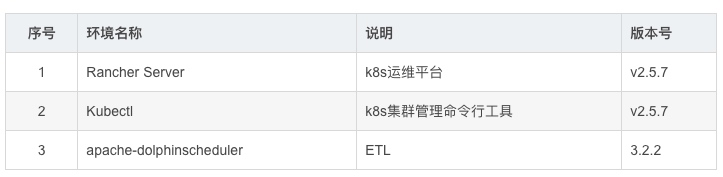
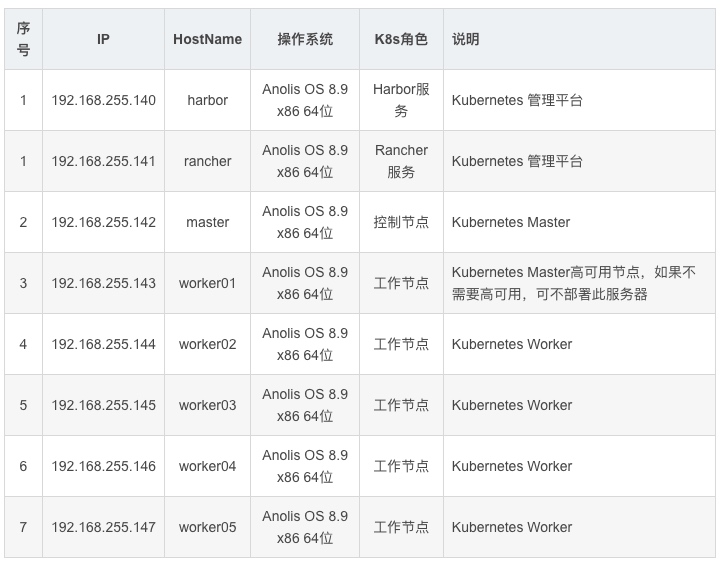
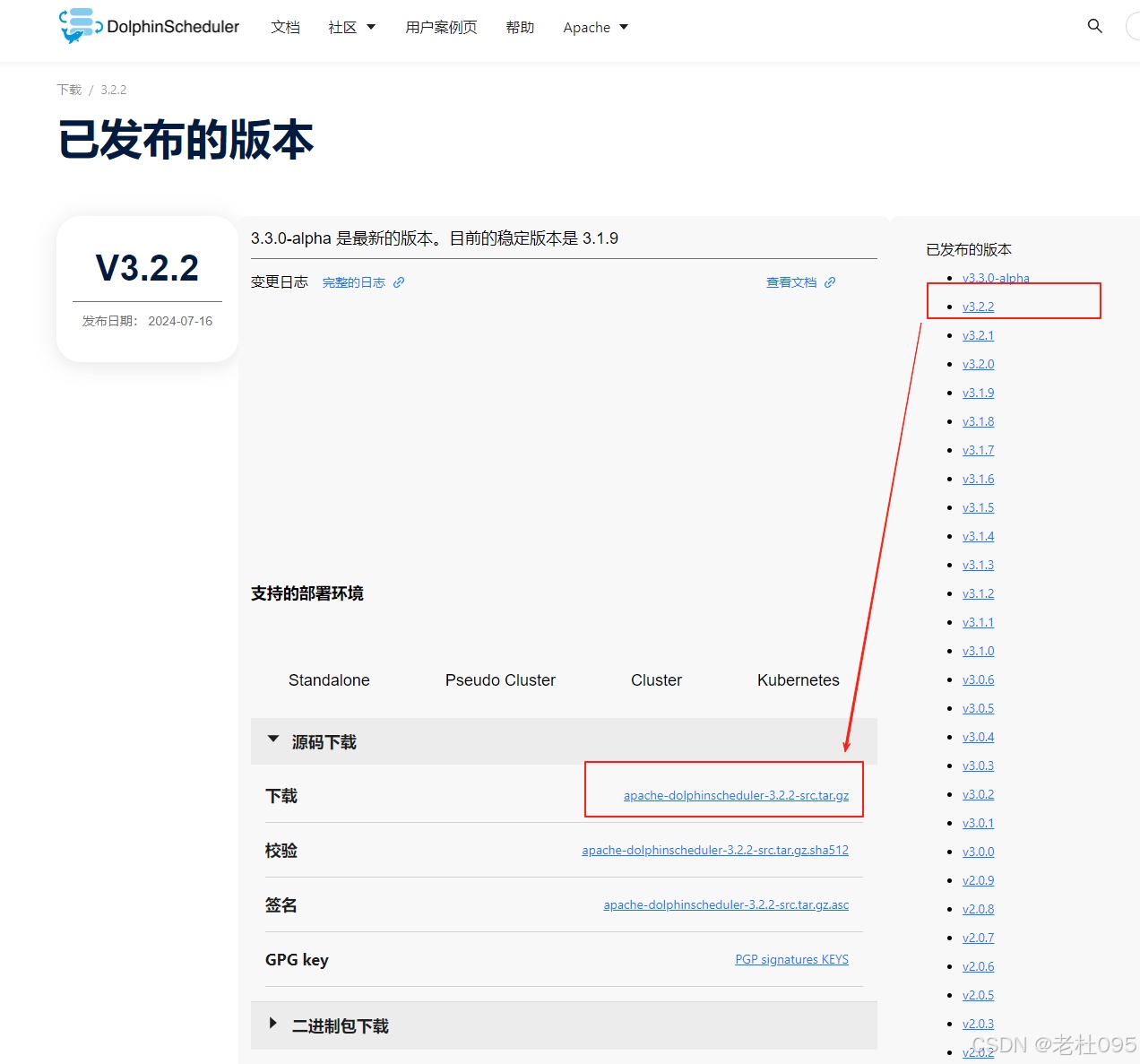
[root@master ~]# mkdir /opt/dolphinscheduler#[root@master ~]# cd /opt/dolphinscheduler[root@master dolphinscheduler]# curl -Lo https://dlcdn.apache.org/dolphinscheduler/3.2.2/apache-dolphinscheduler-3.2.2-src.tar.gz[root@master dolphinscheduler]# tar -xzvf ./apache-dolphinscheduler-3.2.2-src.tar.gz
(1)、修改Chart.yaml配置文件
将repository: https://raw.githubusercontent.com/bitnami/charts/archive-full-index/bitnami改为repository: https://raw.gitmirror.com/bitnami/charts/archive-full-index/bitnami
[root@master dolphinscheduler]# cd /opt/dolphinscheduler/apache-dolphinscheduler-3.2.2-src/deploy/kubernetes/dolphinscheduler[root@master dolphinscheduler]# vim Chart.yaml
# Application charts are a collection of templates that can be packaged into versioned archives# to be deployed.## Library charts provide useful utilities or functions for the chart developer. They're included as# a dependency of application charts to inject those utilities and functions into the rendering# pipeline. Library charts do not define any templates and therefore cannot be deployed.type: application# This is the chart version. This version number should be incremented each time you make changes# to the chart and its templates, including the app version.version: 3.3.0-alpha# This is the version number of the application being deployed. This version number should be# incremented each time you make changes to the application.appVersion: 3.3.0-alphadependencies:- name: postgresql version: 10.3.18 # Due to a change in the Bitnami repo, https://charts.bitnami.com/bitnami was truncated only # containing entries for the latest 6 months (from January 2022 on). # This URL: https://raw.githubusercontent.com/bitnami/charts/archive-full-index/bitnami # contains the full 'index.yaml'. # See detail here: https://github.com/bitnami/charts/issues/10833 #repository: https://raw.githubusercontent.com/bitnami/charts/archive-full-index/bitnami repository: https://raw.gitmirror.com/bitnami/charts/archive-full-index/bitnami condition: postgresql.enabled- name: zookeeper version: 6.5.3 # Same as above. #repository: https://raw.githubusercontent.com/bitnami/charts/archive-full-index/bitnami repository: https://raw.gitmirror.com/bitnami/charts/archive-full-index/bitnami condition: zookeeper.enabled- name: mysql version: 9.4.1 #repository: https://raw.githubusercontent.com/bitnami/charts/archive-full-index/bitnami repository: https://raw.gitmirror.com/bitnami/charts/archive-full-index/bitnami condition: mysql.enabled- name: minio version: 11.10.13 #repository: https://raw.githubusercontent.com/bitnami/charts/archive-full-index/bitnami repository: https://raw.gitmirror.com/bitnami/charts/archive-full-index/bitnami condition: minio.enabled
(2)、执行helm更新
Chart.yaml配置文件修改完成后执行下面的命令:
[root@master dolphinscheduler]# helm repo add bitnami-full-index https://raw.gitmirror.com/bitnami/charts/archive-full-index/bitnami[root@master dolphinscheduler]# helm repo add bitnami https://charts.bitnami.com/bitnami[root@master dolphinscheduler]# helm dependency update .
(3)、解压依赖文件
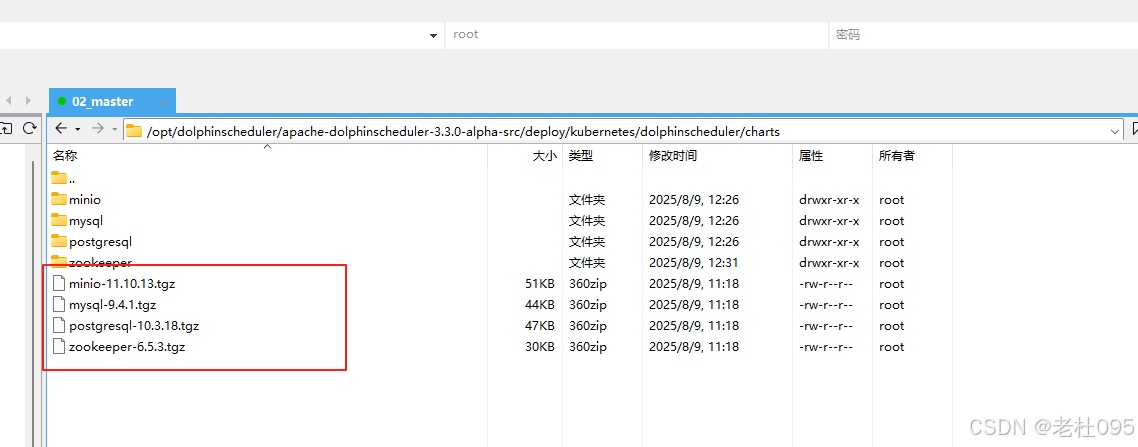
helm更新完成后,在当前目录会新生成【charts】目录,该目录下就是过helm更新下载到本地的依赖文件,如下图所示:
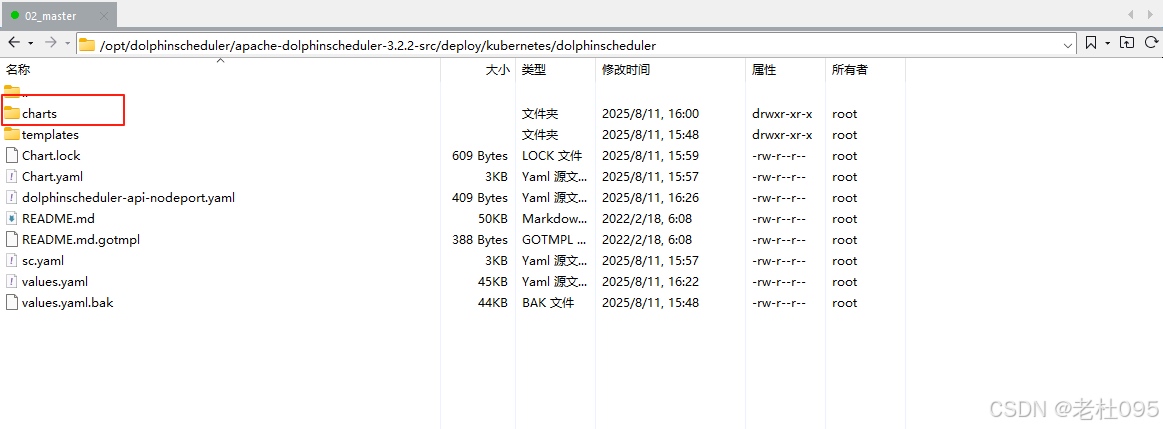
解压依赖包文件,因为本次安装除了Mysql都需要同步安装,所以要解压minio-11.10.13.tgz,postgresql-10.3.18.tgz,zookeeper-6.5.3.tgz这几个压缩包
[root@master dolphinscheduler]# tar -zxvf minio-11.10.13.tgz[root@master dolphinscheduler]# tar -zxvf postgresql-10.3.18.tgz[root@master dolphinscheduler]# tar -zxvf zookeeper-6.5.3.tgz
cd /opt/dolphinscheduler/apache-dolphinscheduler-3.2.2-src/deploy/kubernetes/dolphinschedulervim values.yaml
(1)、修改初始镜像
需要修改busybox和dolphinscheduler各个组件的镜像地址,修改后如下:
# -- World time and date for cities in all time zonestimezone: "Asia/Shanghai"# -- Used to detect whether dolphinscheduler dependent services such as database are readyinitImage: # -- Image pull policy. Options: Always, Never, IfNotPresent pullPolicy: "IfNotPresent" # -- Specify initImage repository #busybox: "busybox:1.30.1" busybox: "registry.cn-hangzhou.aliyuncs.com/docker_image-ljx/busybox:1.30.1"image: # -- Docker image repository for the DolphinScheduler registry: registry.cn-hangzhou.aliyuncs.com/docker_image-ljx # -- Docker image version for the DolphinScheduler tag: 3.2.2 # -- Image pull policy. Options: Always, Never, IfNotPresent pullPolicy: "IfNotPresent" # -- Specify a imagePullSecrets pullSecret: "" # -- master image master: dolphinscheduler-master # -- worker image worker: dolphinscheduler-worker # -- api-server image api: dolphinscheduler-api # -- alert-server image alert: dolphinscheduler-alert-server # -- tools image tools: dolphinscheduler-tools
(2)、修改postgresql配置
本文安装依赖的数据库配置了默认的数据库postgresql,参见配置datasource.profile: postgresql,但是values.yaml的默认配置中并没有配置postgresql镜像,会导致postgresql镜像拉取失败。
本文dolphinscheduler依赖于bitnami postgresql的Chart,且已经在上一步 解压了。获取镜像地址的方式只需进入解压目录(/opt/dolphinscheduler/apache-dolphinscheduler-3.2.2-src/deploy/kubernetes/dolphinscheduler/charts/postgresql)。
查看postgresql的values.yaml(/opt/dolphinscheduler/apache-dolphinscheduler-3.2.2-src/deploy/kubernetes/dolphinscheduler/charts/postgresql/values.yaml)找到镜像地址:
image: registry: docker.io repository: bitnami/postgresql tag: 11.11.0-debian-10-r71 ## Specify a imagePullPolicy ## Defaults to 'Always' if image tag is 'latest', else set to 'IfNotPresent' ## ref: http://kubernetes.io/docs/user-guide/images/#pre-pulling-images ## pullPolicy: IfNotPresent ## Optionally specify an array of imagePullSecrets. ## Secrets must be manually created in the namespace. ## ref: https://kubernetes.io/docs/tasks/configure-pod-container/pull-image-private-registry/ ## # pullSecrets: # - myRegistryKeySecretName ## Set to true if you would like to see extra information on logs ## It turns BASH and/or NAMI debugging in the image ## debug: false
复制上述配置文件中的image配置信息,如下图所示:
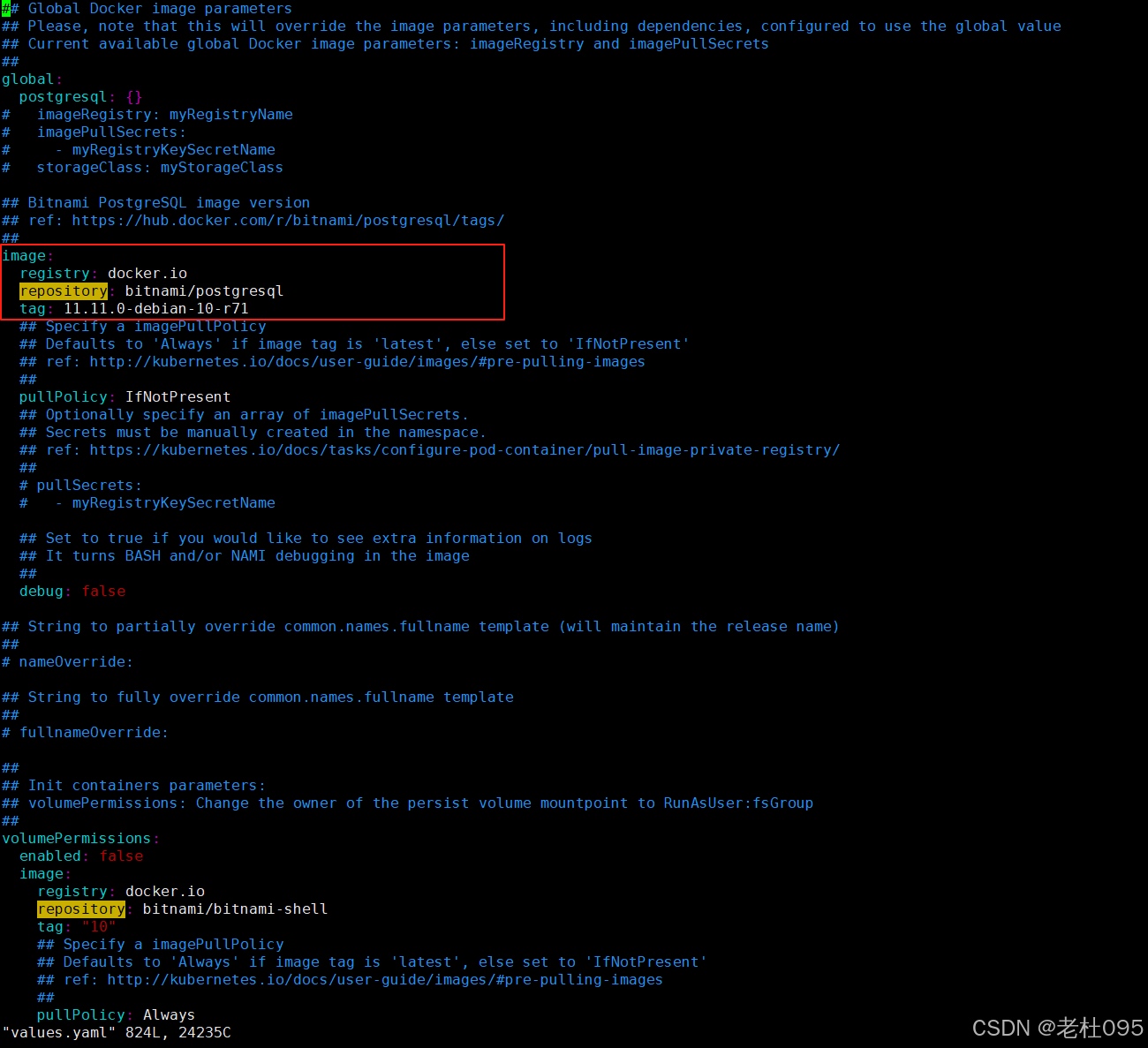
将上步复制到image粘贴至/opt/dolphinscheduler/apache-dolphinscheduler-3.2.2-src/deploy/kubernetes/dolphinscheduler/values.yaml配置文件中postgresql配置项下,如下所示:
datasource: # -- The profile of datasource profile: postgresqlpostgresql: image: registry: docker.io repository: bitnami/postgresql tag: 11.11.0-debian-10-r71 # -- If not exists external PostgreSQL, by default, the DolphinScheduler will use a internal PostgreSQL enabled: true # -- The username for internal PostgreSQL postgresqlUsername: "root" # -- The password for internal PostgreSQL postgresqlPassword: "root" # -- The database for internal PostgreSQL postgresqlDatabase: "dolphinscheduler" # -- The driverClassName for internal PostgreSQL driverClassName: "org.postgresql.Driver" # -- The params for internal PostgreSQL params: "characterEncoding=utf8" persistence: # -- Set postgresql.persistence.enabled to true to mount a new volume for internal PostgreSQL enabled: false # -- `PersistentVolumeClaim` size size: "20Gi" # -- PostgreSQL data persistent volume storage class. If set to "-", storageClassName: "", which disables dynamic provisioning storageClass: "-"
(3)、修改minio配置
查看minio的values.yaml(/opt/dolphinscheduler/apache-dolphinscheduler-3.2.2-src/deploy/kubernetes/dolphinscheduler/charts/minio/values.yaml)找到镜像地址:
image: registry: docker.io repository: bitnami/minio tag: 2022.10.29-debian-11-r0 digest: "" ## Specify a imagePullPolicy ## Defaults to 'Always' if image tag is 'latest', else set to 'IfNotPresent' ## ref: https://kubernetes.io/docs/user-guide/images/#pre-pulling-images ## pullPolicy: IfNotPresent ## Optionally specify an array of imagePullSecrets. ## Secrets must be manually created in the namespace. ## ref: https://kubernetes.io/docs/tasks/configure-pod-container/pull-image-private-registry/ ## e.g: ## pullSecrets: ## - myRegistryKeySecretName ## pullSecrets: [] ## Set to true if you would like to see extra information on logs ## debug: false
复制上述配置文件中的image配置信息,如下图所示:
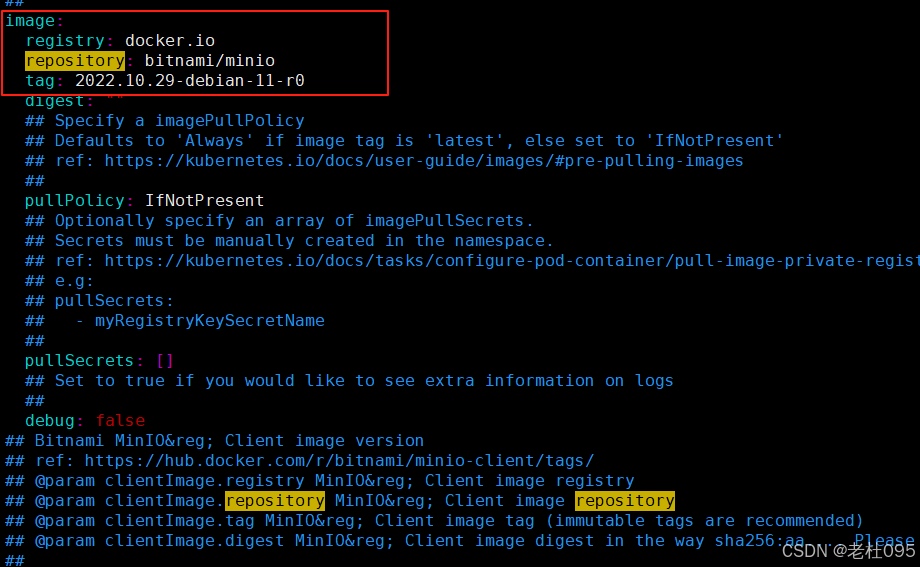
将上步复制到image粘贴至/opt/dolphinscheduler/apache-dolphinscheduler-3.2.2-src/deploy/kubernetes/dolphinscheduler/values.yaml配置文件中minio配置项下,如下所示:
minio: image: registry: docker.io repository: bitnami/minio tag: 2022.10.29-debian-11-r0 # -- Deploy minio and configure it as the default storage for DolphinScheduler, note this is for demo only, not for production. enabled: true auth: # -- minio username rootUser: minioadmin # -- minio password rootPassword: minioadmin persistence: # -- Set minio.persistence.enabled to true to mount a new volume for internal minio enabled: false # -- minio default buckets defaultBuckets: "dolphinscheduler"
(4)、修改zookeeper配置
查看zookeeper的values.yaml(/opt/dolphinscheduler/apache-dolphinscheduler-3.2.2-src/deploy/kubernetes/dolphinscheduler/charts/zookeeper/values.yaml)找到镜像地址:
image: registry: docker.io repository: bitnami/zookeeper tag: 3.6.2-debian-10-r185 ## Specify a imagePullPolicy ## Defaults to 'Always' if image tag is 'latest', else set to 'IfNotPresent' ## ref: http://kubernetes.io/docs/user-guide/images/#pre-pulling-images ## pullPolicy: IfNotPresent ## Optionally specify an array of imagePullSecrets. ## Secrets must be manually created in the namespace. ## ref: https://kubernetes.io/docs/tasks/configure-pod-container/pull-image-private-registry/ ## # pullSecrets: # - myRegistryKeySecretName ## Set to true if you would like to see extra information on logs ## It turns BASH and/or NAMI debugging in the image ## debug: false
复制上述配置文件中的image配置信息,如下图所示:
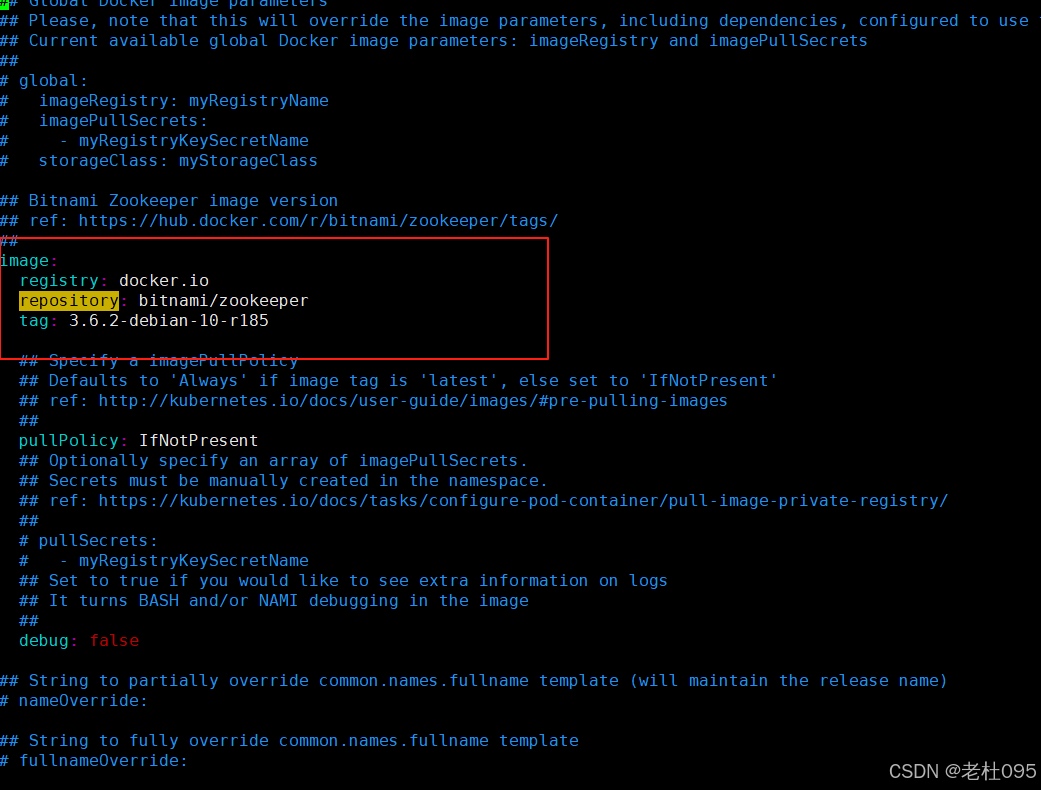
将上步复制到image粘贴至/opt/dolphinscheduler/apache-dolphinscheduler-3.2.2-src/deploy/kubernetes/dolphinscheduler/values.yaml配置文件中zookeeper配置项下,如下所示:
zookeeper: image: registry: docker.io repository: bitnami/zookeeper tag: 3.6.2-debian-10-r185 # -- If not exists external registry, the zookeeper registry will be used by default. enabled: true service: # -- The port of zookeeper port: 2181 # -- A list of comma separated Four Letter Words commands to use fourlwCommandsWhitelist: "srvr,ruok,wchs,cons" persistence: # -- Set `zookeeper.persistence.enabled` to true to mount a new volume for internal ZooKeeper enabled: false # -- PersistentVolumeClaim size size: "20Gi" # -- ZooKeeper data persistent volume storage class. If set to "-", storageClassName: "", which disables dynamic provisioning storageClass: "-"
(5)、修改master配置
master: # -- Enable or disable the Master component enabled: true replicas: "1" resources: limits: memory: "4Gi" cpu: "4" requests: memory: "2Gi" cpu: "500m" persistentVolumeClaim: # -- Set `worker.persistentVolumeClaim.enabled` to `true` to enable `persistentVolumeClaim` for `worker` enabled: true ## dolphinscheduler data volume dataPersistentVolume: # -- Set `worker.persistentVolumeClaim.dataPersistentVolume.enabled` to `true` to mount a data volume for `worker` enabled: true # -- `PersistentVolumeClaim` access modes accessModes: - "ReadWriteOnce" # -- `Worker` data persistent volume storage class. If set to "-", storageClassName: "", which disables dynamic provisioning storageClassName: "-" # -- `PersistentVolumeClaim` size storage: "20Gi" env: # -- The jvm options for master server JAVA_OPTS: "-Xms1g -Xmx1g -Xmn512m"
(6)、修改worker配置
nfs-storage存储卷的创建
sc.yaml配置文件如下:
## 创建了一个存储类apiVersion: storage.k8s.io/v1kind: StorageClassmetadata: name: nfs-storage annotations: storageclass.kubernetes.io/is-default-class: "true"provisioner: k8s-sigs.io/nfs-subdir-external-provisionerparameters: archiveOnDelete: "true" ## 删除pv的时候,pv的内容是否要备份---apiVersion: apps/v1kind: Deploymentmetadata: name: nfs-client labels: app: nfs-client # replace with namespace where provisioner is deployed namespace: defaultspec: replicas: 1 strategy: type: Recreate selector: matchLabels: app: nfs-client template: metadata: labels: app: nfs-client spec: serviceAccountName: nfs-client containers: - name: nfs-client image: registry.cn-hangzhou.aliyuncs.com/lfy_k8s_images/nfs-subdir-external-provisioner:v4.0.2 # resources: # limits: # cpu: 10m # requests: # cpu: 10m volumeMounts: - name: nfs-client-root mountPath: /persistentvolumes env: - name: PROVISIONER_NAME value: k8s-sigs.io/nfs-subdir-external-provisioner - name: NFS_SERVER value: 192.168.255.140 ## 指定自己nfs服务器地址 - name: NFS_PATH value: /data/nfsdata ## nfs服务器共享的目录 volumes: - name: nfs-client-root nfs: server: 192.168.255.140 path: /data/nfsdata---apiVersion: v1kind: ServiceAccountmetadata: name: nfs-client # replace with namespace where provisioner is deployed namespace: default---kind: ClusterRoleapiVersion: rbac.authorization.k8s.io/v1metadata: name: nfs-client-runnerrules: - apiGroups: [""] resources: ["nodes"] verbs: ["get", "list", "watch"] - apiGroups: [""] resources: ["persistentvolumes"] verbs: ["get", "list", "watch", "create", "delete"] - apiGroups: [""] resources: ["persistentvolumeclaims"] verbs: ["get", "list", "watch", "update"] - apiGroups: ["storage.k8s.io"] resources: ["storageclasses"] verbs: ["get", "list", "watch"] - apiGroups: [""] resources: ["events"] verbs: ["create", "update", "patch"]---kind: ClusterRoleBindingapiVersion: rbac.authorization.k8s.io/v1metadata: name: run-nfs-clientsubjects: - kind: ServiceAccount name: nfs-client # replace with namespace where provisioner is deployed namespace: defaultroleRef: kind: ClusterRole name: nfs-client-runner apiGroup: rbac.authorization.k8s.io---kind: RoleapiVersion: rbac.authorization.k8s.io/v1metadata: name: leader-locking-nfs-client # replace with namespace where provisioner is deployed namespace: defaultrules: - apiGroups: [""] resources: ["endpoints"] verbs: ["get", "list", "watch", "create", "update", "patch"]---kind: RoleBindingapiVersion: rbac.authorization.k8s.io/v1metadata: name: leader-locking-nfs-client # replace with namespace where provisioner is deployed namespace: defaultsubjects: - kind: ServiceAccount name: nfs-client # replace with namespace where provisioner is deployed namespace: defaultroleRef: kind: Role name: leader-locking-nfs-client apiGroup: rbac.authorization.k8s.io
执行命令:
# 执行发布安装kubectl apply -f sc.yaml# 查看nfs-client-provisioner pod 是否安装成功kubectl get pod -A
Worker节点配置如下:
worker: # -- Enable or disable the Worker component enabled: true replicas: "1" resources: limits: memory: "4Gi" cpu: "2" requests: memory: "2Gi" cpu: "500m" persistentVolumeClaim: # -- Set `worker.persistentVolumeClaim.enabled` to `true` to enable `persistentVolumeClaim` for `worker` enabled: true ## dolphinscheduler data volume dataPersistentVolume: # -- Set `worker.persistentVolumeClaim.dataPersistentVolume.enabled` to `true` to mount a data volume for `worker` enabled: true # -- `PersistentVolumeClaim` access modes accessModes: - "ReadWriteOnce" # -- `Worker` data persistent volume storage class. If set to "-", storageClassName: "", which disables dynamic provisioning storageClassName: "nfs-storage" # -- `PersistentVolumeClaim` size storage: "20Gi" env: # -- The jvm options for master server JAVA_OPTS: "-Xms1g -Xmx1g -Xmn512m"
(6)、修改alter配置
alert: # -- Enable or disable the Worker component enabled: true replicas: "1" resources: limits: memory: "2Gi" cpu: "1" requests: memory: "1Gi" cpu: "500m" persistentVolumeClaim: # -- Set `worker.persistentVolumeClaim.enabled` to `true` to enable `persistentVolumeClaim` for `worker` enabled: true ## dolphinscheduler data volume dataPersistentVolume: # -- Set `worker.persistentVolumeClaim.dataPersistentVolume.enabled` to `true` to mount a data volume for `worker` enabled: true # -- `PersistentVolumeClaim` access modes accessModes: - "ReadWriteOnce" # -- `Worker` data persistent volume storage class. If set to "-", storageClassName: "", which disables dynamic provisioning storageClassName: "-" # -- `PersistentVolumeClaim` size storage: "20Gi" env: # -- The jvm options for master server JAVA_OPTS: "-Xms1g -Xmx1g -Xmn512m"
完整的values.yaml配置文件如下:
## Licensed to the Apache Software Foundation (ASF) under one or more# contributor license agreements. See the NOTICE file distributed with# this work for additional information regarding copyright ownership.# The ASF licenses this file to You under the Apache License, Version 2.0# (the "License"); you may not use this file except in compliance with# the License. You may obtain a copy of the License at## http://www.apache.org/licenses/LICENSE-2.0## Unless required by applicable law or agreed to in writing, software# distributed under the License is distributed on an "AS IS" BASIS,# WITHOUT WARRANTIES OR CONDITIONS OF ANY KIND, either express or implied.# See the License for the specific language governing permissions and# limitations under the License.## Default values for dolphinscheduler-chart.# This is a YAML-formatted file.# Declare variables to be passed into your templates.# -- World time and date for cities in all time zonestimezone: "Asia/Shanghai"# -- Used to detect whether dolphinscheduler dependent services such as database are readyinitImage: # -- Image pull policy. Options: Always, Never, IfNotPresent pullPolicy: "IfNotPresent" # -- Specify initImage repository busybox: "registry.cn-hangzhou.aliyuncs.com/docker_image-ljx/busybox:1.30.1"image: # -- Docker image repository for the DolphinScheduler registry: registry.cn-hangzhou.aliyuncs.com/docker_image-ljx # -- Docker image version for the DolphinScheduler tag: 3.2.2 # -- Image pull policy. Options: Always, Never, IfNotPresent pullPolicy: "IfNotPresent" # -- Specify a imagePullSecrets pullSecret: "" # -- master image master: dolphinscheduler-master # -- worker image worker: dolphinscheduler-worker # -- api-server image api: dolphinscheduler-api # -- alert-server image alert: dolphinscheduler-alert-server # -- tools image tools: dolphinscheduler-toolsdatasource: # -- The profile of datasource profile: postgresqlpostgresql: image: registry: docker.io repository: bitnami/postgresql tag: 11.11.0-debian-10-r71 # -- If not exists external PostgreSQL, by default, the DolphinScheduler will use a internal PostgreSQL enabled: true # -- The username for internal PostgreSQL postgresqlUsername: "root" # -- The password for internal PostgreSQL postgresqlPassword: "root" # -- The database for internal PostgreSQL postgresqlDatabase: "dolphinscheduler" # -- The driverClassName for internal PostgreSQL driverClassName: "org.postgresql.Driver" # -- The params for internal PostgreSQL params: "characterEncoding=utf8" persistence: # -- Set postgresql.persistence.enabled to true to mount a new volume for internal PostgreSQL enabled: false # -- `PersistentVolumeClaim` size size: "20Gi" # -- PostgreSQL data persistent volume storage class. If set to "-", storageClassName: "", which disables dynamic provisioning storageClass: "-"mysql: image: registry: docker.io repository: bitnami/mysql tag: 8.0.31-debian-11-r0 # -- If not exists external MySQL, by default, the DolphinScheduler will use a internal MySQL enabled: false # -- mysql driverClassName driverClassName: "com.mysql.cj.jdbc.Driver" auth: # -- mysql username username: "ds" # -- mysql password password: "ds" # -- mysql database database: "dolphinscheduler" # -- mysql params params: "characterEncoding=utf8" primary: persistence: # -- Set mysql.primary.persistence.enabled to true to mount a new volume for internal MySQL enabled: false # -- `PersistentVolumeClaim` size size: "20Gi" # -- MySQL data persistent volume storage class. If set to "-", storageClassName: "", which disables dynamic provisioning storageClass: "-"minio: image: registry: docker.io repository: bitnami/minio tag: 2022.10.29-debian-11-r0 # -- Deploy minio and configure it as the default storage for DolphinScheduler, note this is for demo only, not for production. enabled: true auth: # -- minio username rootUser: minioadmin # -- minio password rootPassword: minioadmin persistence: # -- Set minio.persistence.enabled to true to mount a new volume for internal minio enabled: false # -- minio default buckets defaultBuckets: "dolphinscheduler"externalDatabase: # -- If exists external database, and set postgresql.enable value to false. # external database will be used, otherwise Dolphinscheduler's internal database will be used. enabled: false # -- The type of external database, supported types: postgresql, mysql type: "postgresql" # -- The host of external database host: "localhost" # -- The port of external database port: "5432" # -- The username of external database username: "root" # -- The password of external database password: "root" # -- The database of external database database: "dolphinscheduler" # -- The params of external database params: "characterEncoding=utf8" # -- The driverClassName of external database driverClassName: "org.postgresql.Driver"zookeeper: image: registry: docker.io repository: bitnami/zookeeper tag: 3.6.2-debian-10-r185 # -- If not exists external registry, the zookeeper registry will be used by default. enabled: true service: # -- The port of zookeeper port: 2181 # -- A list of comma separated Four Letter Words commands to use fourlwCommandsWhitelist: "srvr,ruok,wchs,cons" persistence: # -- Set `zookeeper.persistence.enabled` to true to mount a new volume for internal ZooKeeper enabled: false # -- PersistentVolumeClaim size size: "20Gi" # -- ZooKeeper data persistent volume storage class. If set to "-", storageClassName: "", which disables dynamic provisioning storageClass: "-"registryEtcd: # -- If you want to use Etcd for your registry center, change this value to true. And set zookeeper.enabled to false enabled: false # -- Etcd endpoints endpoints: "" # -- Etcd namespace namespace: "dolphinscheduler" # -- Etcd user user: "" # -- Etcd passWord passWord: "" # -- Etcd authority authority: "" # Please create a new folder: deploy/kubernetes/dolphinscheduler/etcd-certs ssl: # -- If your Etcd server has configured with ssl, change this value to true. About certification files you can see [here](https://github.com/etcd-io/jetcd/blob/main/docs/SslConfig.md) for how to convert. enabled: false # -- CertFile file path certFile: "etcd-certs/ca.crt" # -- keyCertChainFile file path keyCertChainFile: "etcd-certs/client.crt" # -- keyFile file path keyFile: "etcd-certs/client.pem"registryJdbc: # -- If you want to use JDbc for your registry center, change this value to true. And set zookeeper.enabled and registryEtcd.enabled to false enabled: false # -- Used to schedule refresh the ephemeral data/ lock termRefreshInterval: 2s # -- Used to calculate the expire time termExpireTimes: 3 hikariConfig: # -- Default use same Dolphinscheduler's database, if you want to use other database please change `enabled` to `true` and change other configs enabled: false # -- Default use same Dolphinscheduler's database if you don't change this value. If you set this value, Registry jdbc's database type will use it driverClassName: com.mysql.cj.jdbc.Driver # -- Default use same Dolphinscheduler's database if you don't change this value. If you set this value, Registry jdbc's database type will use it jdbcurl: jdbc:mysql:// # -- Default use same Dolphinscheduler's database if you don't change this value. If you set this value, Registry jdbc's database type will use it username: "" # -- Default use same Dolphinscheduler's database if you don't change this value. If you set this value, Registry jdbc's database type will use it password: ""## If exists external registry and set zookeeper.enable value to false, the external registry will be used.externalRegistry: # -- If exists external registry and set `zookeeper.enable` && `registryEtcd.enabled` && `registryJdbc.enabled` to false, specify the external registry plugin name registryPluginName: "zookeeper" # -- If exists external registry and set `zookeeper.enable` && `registryEtcd.enabled` && `registryJdbc.enabled` to false, specify the external registry servers registryServers: "127.0.0.1:2181"security: authentication: # -- Authentication types (supported types: PASSWORD,LDAP,CASDOOR_SSO) type: PASSWORD # IF you set type `LDAP`, below config will be effective ldap: # -- LDAP urls urls: ldap://ldap.forumsys.com:389/ # -- LDAP base dn basedn: dc=example,dc=com # -- LDAP username username: cn=read-only-admin,dc=example,dc=com # -- LDAP password password: password user: # -- Admin user account when you log-in with LDAP admin: read-only-admin # -- LDAP user identity attribute identityattribute: uid # -- LDAP user email attribute emailattribute: mail # -- action when ldap user is not exist,default value: CREATE. Optional values include(CREATE,DENY) notexistaction: CREATE ssl: # -- LDAP ssl switch enable: false # -- LDAP jks file absolute path, do not change this value truststore: "/opt/ldapkeystore.jks" # -- LDAP jks file base64 content. # If you use macOS, please run `base64 -b 0 -i /path/to/your.jks`. # If you use Linux, please run `base64 -w 0 /path/to/your.jks`. # If you use Windows, please run `certutil -f -encode /path/to/your.jks`. # Then copy the base64 content to below field in one line jksbase64content: "" # -- LDAP jks password truststorepassword: ""conf: # -- auto restart, if true, all components will be restarted automatically after the common configuration is updated. if false, you need to restart the components manually. default is false auto: false # common configuration common: # -- user data local directory path, please make sure the directory exists and have read write permissions data.basedir.path: /tmp/dolphinscheduler # -- resource storage type: HDFS, S3, OSS, GCS, ABS, NONE resource.storage.type: S3 # -- resource store on HDFS/S3 path, resource file will store to this base path, self configuration, please make sure the directory exists on hdfs and have read write permissions. "/dolphinscheduler" is recommended resource.storage.upload.base.path: /dolphinscheduler # -- The AWS access key. if resource.storage.type=S3 or use EMR-Task, This configuration is required resource.aws.access.key.id: minioadmin # -- The AWS secret access key. if resource.storage.type=S3 or use EMR-Task, This configuration is required resource.aws.secret.access.key: minioadmin # -- The AWS Region to use. if resource.storage.type=S3 or use EMR-Task, This configuration is required resource.aws.region: ca-central-1 # -- The name of the bucket. You need to create them by yourself. Otherwise, the system cannot start. All buckets in Amazon S3 share a single namespace; ensure the bucket is given a unique name. resource.aws.s3.bucket.name: dolphinscheduler # -- You need to set this parameter when private cloud s3. If S3 uses public cloud, you only need to set resource.aws.region or set to the endpoint of a public cloud such as S3.cn-north-1.amazonaws.com.cn resource.aws.s3.endpoint: http://minio:9000 # -- alibaba cloud access key id, required if you set resource.storage.type=OSS resource.alibaba.cloud.access.key.id: <your-access-key-id> # -- alibaba cloud access key secret, required if you set resource.storage.type=OSS resource.alibaba.cloud.access.key.secret: <your-access-key-secret> # -- alibaba cloud region, required if you set resource.storage.type=OSS resource.alibaba.cloud.region: cn-hangzhou # -- oss bucket name, required if you set resource.storage.type=OSS resource.alibaba.cloud.oss.bucket.name: dolphinscheduler # -- oss bucket endpoint, required if you set resource.storage.type=OSS resource.alibaba.cloud.oss.endpoint: https://oss-cn-hangzhou.aliyuncs.com # -- azure storage account name, required if you set resource.storage.type=ABS resource.azure.client.id: minioadmin # -- azure storage account key, required if you set resource.storage.type=ABS resource.azure.client.secret: minioadmin # -- azure storage subId, required if you set resource.storage.type=ABS resource.azure.subId: minioadmin # -- azure storage tenantId, required if you set resource.storage.type=ABS resource.azure.tenant.id: minioadmin # -- if resource.storage.type=HDFS, the user must have the permission to create directories under the HDFS root path resource.hdfs.root.user: hdfs # -- if resource.storage.type=S3, the value like: s3a://dolphinscheduler; if resource.storage.type=HDFS and namenode HA is enabled, you need to copy core-site.xml and hdfs-site.xml to conf dir resource.hdfs.fs.defaultFS: hdfs://mycluster:8020 # -- whether to startup kerberos hadoop.security.authentication.startup.state: false # -- java.security.krb5.conf path java.security.krb5.conf.path: /opt/krb5.conf # -- login user from keytab username login.user.keytab.username: hdfs-mycluster@ESZ.COM # -- login user from keytab path login.user.keytab.path: /opt/hdfs.headless.keytab # -- kerberos expire time, the unit is hour kerberos.expire.time: 2 # -- resourcemanager port, the default value is 8088 if not specified resource.manager.httpaddress.port: 8088 # -- if resourcemanager HA is enabled, please set the HA IPs; if resourcemanager is single, keep this value empty yarn.resourcemanager.ha.rm.ids: 192.168.xx.xx,192.168.xx.xx # -- if resourcemanager HA is enabled or not use resourcemanager, please keep the default value; If resourcemanager is single, you only need to replace ds1 to actual resourcemanager hostname yarn.application.status.address: http://ds1:%s/ws/v1/cluster/apps/%s # -- job history status url when application number threshold is reached(default 10000, maybe it was set to 1000) yarn.job.history.status.address: http://ds1:19888/ws/v1/history/mapreduce/jobs/%s # -- datasource encryption enable datasource.encryption.enable: false # -- datasource encryption salt datasource.encryption.salt: '!@#$%^&*' # -- data quality option data-quality.jar.dir: # -- Whether hive SQL is executed in the same session support.hive.oneSession: false # -- use sudo or not, if set true, executing user is tenant user and deploy user needs sudo permissions; if set false, executing user is the deploy user and doesn't need sudo permissions sudo.enable: true # -- development state development.state: false # -- rpc port alert.rpc.port: 50052 # -- set path of conda.sh conda.path: /opt/anaconda3/etc/profile.d/conda.sh # -- Task resource limit state task.resource.limit.state: false # -- mlflow task plugin preset repository ml.mlflow.preset_repository: https://github.com/apache/dolphinscheduler-mlflow # -- mlflow task plugin preset repository version ml.mlflow.preset_repository_version: "main" # -- way to collect applicationId: log, aop appId.collect: logcommon: ## Configmap configmap: # -- The jvm options for dolphinscheduler, suitable for all servers DOLPHINSCHEDULER_OPTS: "" # -- User data directory path, self configuration, please make sure the directory exists and have read write permissions DATA_BASEDIR_PATH: "/tmp/dolphinscheduler" # -- Resource store on HDFS/S3 path, please make sure the directory exists on hdfs and have read write permissions RESOURCE_UPLOAD_PATH: "/dolphinscheduler" # dolphinscheduler env # -- Set `HADOOP_HOME` for DolphinScheduler's task environment HADOOP_HOME: "/opt/soft/hadoop" # -- Set `HADOOP_CONF_DIR` for DolphinScheduler's task environment HADOOP_CONF_DIR: "/opt/soft/hadoop/etc/hadoop" # -- Set `SPARK_HOME` for DolphinScheduler's task environment SPARK_HOME: "/opt/soft/spark" # -- Set `PYTHON_LAUNCHER` for DolphinScheduler's task environment PYTHON_LAUNCHER: "/usr/bin/python/bin/python3" # -- Set `JAVA_HOME` for DolphinScheduler's task environment JAVA_HOME: "/opt/java/openjdk" # -- Set `HIVE_HOME` for DolphinScheduler's task environment HIVE_HOME: "/opt/soft/hive" # -- Set `FLINK_HOME` for DolphinScheduler's task environment FLINK_HOME: "/opt/soft/flink" # -- Set `DATAX_LAUNCHER` for DolphinScheduler's task environment DATAX_LAUNCHER: "/opt/soft/datax/bin/datax.py" ## Shared storage persistence mounted into api, master and worker, such as Hadoop, Spark, Flink and DataX binary package sharedStoragePersistence: # -- Set `common.sharedStoragePersistence.enabled` to `true` to mount a shared storage volume for Hadoop, Spark binary and etc enabled: false # -- The mount path for the shared storage volume mountPath: "/opt/soft" # -- `PersistentVolumeClaim` access modes, must be `ReadWriteMany` accessModes: - "ReadWriteMany" # -- Shared Storage persistent volume storage class, must support the access mode: ReadWriteMany storageClassName: "-" # -- `PersistentVolumeClaim` size storage: "20Gi" ## If RESOURCE_STORAGE_TYPE is HDFS and FS_DEFAULT_FS is file:///, fsFileResourcePersistence should be enabled for resource storage fsFileResourcePersistence: # -- Set `common.fsFileResourcePersistence.enabled` to `true` to mount a new file resource volume for `api` and `worker` enabled: false # -- `PersistentVolumeClaim` access modes, must be `ReadWriteMany` accessModes: - "ReadWriteMany" # -- Resource persistent volume storage class, must support the access mode: `ReadWriteMany` storageClassName: "-" # -- `PersistentVolumeClaim` size storage: "20Gi"master: # -- Enable or disable the Master component enabled: true # -- PodManagementPolicy controls how pods are created during initial scale up, when replacing pods on nodes, or when scaling down. podManagementPolicy: "Parallel" # -- Replicas is the desired number of replicas of the given Template. replicas: "1" # -- You can use annotations to attach arbitrary non-identifying metadata to objects. # Clients such as tools and libraries can retrieve this metadata. annotations: {} # -- Affinity is a group of affinity scheduling rules. If specified, the pod's scheduling constraints. # More info: [node-affinity](https://kubernetes.io/docs/concepts/scheduling-eviction/assign-pod-node/#node-affinity) affinity: {} # -- NodeSelector is a selector which must be true for the pod to fit on a node. # Selector which must match a node's labels for the pod to be scheduled on that node. # More info: [assign-pod-node](https://kubernetes.io/docs/concepts/scheduling-eviction/assign-pod-node/) nodeSelector: {} # -- Tolerations are appended (excluding duplicates) to pods running with this RuntimeClass during admission, # effectively unioning the set of nodes tolerated by the pod and the RuntimeClass. tolerations: [] # -- Compute Resources required by this container. # More info: [manage-resources-containers](https://kubernetes.io/docs/concepts/configuration/manage-resources-containers/) #resources: {} resources: limits: memory: "4Gi" cpu: "4" requests: memory: "2Gi" cpu: "500m" # -- enable configure custom config enableCustomizedConfig: false # -- configure aligned with https://github.com/apache/dolphinscheduler/blob/dev/dolphinscheduler-master/src/main/resources/application.yaml customizedConfig: { } # customizedConfig: # application.yaml: | # profiles: # active: postgresql # banner: # charset: UTF-8 # jackson: # time-zone: UTC # date-format: "yyyy-MM-dd HH:mm:ss" # -- Periodic probe of container liveness. Container will be restarted if the probe fails. # More info: [container-probes](https://kubernetes.io/docs/concepts/workloads/pods/pod-lifecycle/#container-probes) livenessProbe: # -- Turn on and off liveness probe enabled: true # -- Delay before liveness probe is initiated initialDelaySeconds: "30" # -- How often to perform the probe periodSeconds: "30" # -- When the probe times out timeoutSeconds: "5" # -- Minimum consecutive failures for the probe failureThreshold: "3" # -- Minimum consecutive successes for the probe successThreshold: "1" # -- Periodic probe of container service readiness. Container will be removed from service endpoints if the probe fails. # More info: [container-probes](https://kubernetes.io/docs/concepts/workloads/pods/pod-lifecycle/#container-probes) readinessProbe: # -- Turn on and off readiness probe enabled: true # -- Delay before readiness probe is initiated initialDelaySeconds: "30" # -- How often to perform the probe periodSeconds: "30" # -- When the probe times out timeoutSeconds: "5" # -- Minimum consecutive failures for the probe failureThreshold: "3" # -- Minimum consecutive successes for the probe successThreshold: "1" # -- PersistentVolumeClaim represents a reference to a PersistentVolumeClaim in the same namespace. # The StatefulSet controller is responsible for mapping network identities to claims in a way that maintains the identity of a pod. # Every claim in this list must have at least one matching (by name) volumeMount in one container in the template. # A claim in this list takes precedence over any volumes in the template, with the same name. persistentVolumeClaim: # -- Set `master.persistentVolumeClaim.enabled` to `true` to mount a new volume for `master` enabled: false # -- `PersistentVolumeClaim` access modes accessModes: - "ReadWriteOnce" # -- `Master` logs data persistent volume storage class. If set to "-", storageClassName: "", which disables dynamic provisioning storageClassName: "-" # -- `PersistentVolumeClaim` size storage: "20Gi" env: # -- The jvm options for master server JAVA_OPTS: "-Xms1g -Xmx1g -Xmn512m" # -- Master execute thread number to limit process instances MASTER_EXEC_THREADS: "100" # -- Master execute task number in parallel per process instance MASTER_EXEC_TASK_NUM: "20" # -- Master dispatch task number per batch MASTER_DISPATCH_TASK_NUM: "3" # -- Master host selector to select a suitable worker, optional values include Random, RoundRobin, LowerWeight MASTER_HOST_SELECTOR: "LowerWeight" # -- Master max heartbeat interval MASTER_MAX_HEARTBEAT_INTERVAL: "10s" # -- Master heartbeat error threshold MASTER_HEARTBEAT_ERROR_THRESHOLD: "5" # -- Master commit task retry times MASTER_TASK_COMMIT_RETRYTIMES: "5" # -- master commit task interval, the unit is second MASTER_TASK_COMMIT_INTERVAL: "1s" # -- master state wheel interval, the unit is second MASTER_STATE_WHEEL_INTERVAL: "5s" # -- If set true, will open master overload protection MASTER_SERVER_LOAD_PROTECTION_ENABLED: false # -- Master max system cpu usage, when the master's system cpu usage is smaller then this value, master server can execute workflow. MASTER_SERVER_LOAD_PROTECTION_MAX_SYSTEM_CPU_USAGE_PERCENTAGE_THRESHOLDS: 0.7 # -- Master max jvm cpu usage, when the master's jvm cpu usage is smaller then this value, master server can execute workflow. MASTER_SERVER_LOAD_PROTECTION_MAX_JVM_CPU_USAGE_PERCENTAGE_THRESHOLDS: 0.7 # -- Master max System memory usage , when the master's system memory usage is smaller then this value, master server can execute workflow. MASTER_SERVER_LOAD_PROTECTION_MAX_SYSTEM_MEMORY_USAGE_PERCENTAGE_THRESHOLDS: 0.7 # -- Master max disk usage , when the master's disk usage is smaller then this value, master server can execute workflow. MASTER_SERVER_LOAD_PROTECTION_MAX_DISK_USAGE_PERCENTAGE_THRESHOLDS: 0.7 # -- Master failover interval, the unit is minute MASTER_FAILOVER_INTERVAL: "10m" # -- Master kill application when handle failover MASTER_KILL_APPLICATION_WHEN_HANDLE_FAILOVER: "true" service: # -- annotations may need to be set when want to scrapy metrics by prometheus but not install prometheus operator annotations: {} # -- serviceMonitor for prometheus operator serviceMonitor: # -- Enable or disable master serviceMonitor enabled: false # -- serviceMonitor.interval interval at which metrics should be scraped interval: 15s # -- serviceMonitor.path path of the metrics endpoint path: /actuator/prometheus # -- serviceMonitor.labels ServiceMonitor extra labels labels: {} # -- serviceMonitor.annotations ServiceMonitor annotations annotations: {}worker: # -- Enable or disable the Worker component enabled: true # -- PodManagementPolicy controls how pods are created during initial scale up, when replacing pods on nodes, or when scaling down. podManagementPolicy: "Parallel" # -- Replicas is the desired number of replicas of the given Template. replicas: "3" # -- You can use annotations to attach arbitrary non-identifying metadata to objects. # Clients such as tools and libraries can retrieve this metadata. annotations: {} # -- Affinity is a group of affinity scheduling rules. If specified, the pod's scheduling constraints. # More info: [node-affinity](https://kubernetes.io/docs/concepts/scheduling-eviction/assign-pod-node/#node-affinity) affinity: {} # -- NodeSelector is a selector which must be true for the pod to fit on a node. # Selector which must match a node's labels for the pod to be scheduled on that node. # More info: [assign-pod-node](https://kubernetes.io/docs/concepts/scheduling-eviction/assign-pod-node/) nodeSelector: {} # -- Tolerations are appended (excluding duplicates) to pods running with this RuntimeClass during admission, # effectively unioning the set of nodes tolerated by the pod and the RuntimeClass. tolerations: [ ] # -- Compute Resources required by this container. # More info: [manage-resources-containers](https://kubernetes.io/docs/concepts/configuration/manage-resources-containers/) #resources: {} resources: limits: memory: "4Gi" cpu: "2" requests: memory: "2Gi" cpu: "500m" # -- Periodic probe of container liveness. Container will be restarted if the probe fails. # More info: [container-probes](https://kubernetes.io/docs/concepts/workloads/pods/pod-lifecycle/#container-probes) # -- enable configure custom config enableCustomizedConfig: false # -- configure aligned with https://github.com/apache/dolphinscheduler/blob/dev/dolphinscheduler-worker/src/main/resources/application.yaml customizedConfig: { }# customizedConfig:# application.yaml: |# banner:# charset: UTF-8# jackson:# time-zone: UTC# date-format: "yyyy-MM-dd HH:mm:ss" livenessProbe: # -- Turn on and off liveness probe enabled: true # -- Delay before liveness probe is initiated initialDelaySeconds: "30" # -- How often to perform the probe periodSeconds: "30" # -- When the probe times out timeoutSeconds: "5" # -- Minimum consecutive failures for the probe failureThreshold: "3" # -- Minimum consecutive successes for the probe successThreshold: "1" # -- Periodic probe of container service readiness. Container will be removed from service endpoints if the probe fails. # More info: [container-probes](https://kubernetes.io/docs/concepts/workloads/pods/pod-lifecycle/#container-probes) readinessProbe: # -- Turn on and off readiness probe enabled: true # -- Delay before readiness probe is initiated initialDelaySeconds: "30" # -- How often to perform the probe periodSeconds: "30" # -- When the probe times out timeoutSeconds: "5" # -- Minimum consecutive failures for the probe failureThreshold: "3" # -- Minimum consecutive successes for the probe successThreshold: "1" # -- PersistentVolumeClaim represents a reference to a PersistentVolumeClaim in the same namespace. # The StatefulSet controller is responsible for mapping network identities to claims in a way that maintains the identity of a pod. # Every claim in this list must have at least one matching (by name) volumeMount in one container in the template. # A claim in this list takes precedence over any volumes in the template, with the same name. persistentVolumeClaim: # -- Set `worker.persistentVolumeClaim.enabled` to `true` to enable `persistentVolumeClaim` for `worker` enabled: false ## dolphinscheduler data volume dataPersistentVolume: # -- Set `worker.persistentVolumeClaim.dataPersistentVolume.enabled` to `true` to mount a data volume for `worker` enabled: false # -- `PersistentVolumeClaim` access modes accessModes: - "ReadWriteOnce" # -- `Worker` data persistent volume storage class. If set to "-", storageClassName: "", which disables dynamic provisioning storageClassName: "nfs-storage" # -- `PersistentVolumeClaim` size storage: "20Gi" ## dolphinscheduler logs volume logsPersistentVolume: # -- Set `worker.persistentVolumeClaim.logsPersistentVolume.enabled` to `true` to mount a logs volume for `worker` enabled: false # -- `PersistentVolumeClaim` access modes accessModes: - "ReadWriteOnce" # -- `Worker` logs data persistent volume storage class. If set to "-", storageClassName: "", which disables dynamic provisioning storageClassName: "-" # -- `PersistentVolumeClaim` size storage: "20Gi" env: # -- If set true, will open worker overload protection WORKER_SERVER_LOAD_PROTECTION_ENABLED: false # -- Worker max system cpu usage, when the worker's system cpu usage is smaller then this value, worker server can be dispatched tasks. WORKER_SERVER_LOAD_PROTECTION_MAX_SYSTEM_CPU_USAGE_PERCENTAGE_THRESHOLDS: 0.7 # -- Worker max jvm cpu usage, when the worker's jvm cpu usage is smaller then this value, worker server can be dispatched tasks. WORKER_SERVER_LOAD_PROTECTION_MAX_JVM_CPU_USAGE_PERCENTAGE_THRESHOLDS: 0.7 # -- Worker max memory usage , when the worker's memory usage is smaller then this value, worker server can be dispatched tasks. WORKER_SERVER_LOAD_PROTECTION_MAX_SYSTEM_MEMORY_USAGE_PERCENTAGE_THRESHOLDS: 0.7 # -- Worker max disk usage , when the worker's disk usage is smaller then this value, worker server can be dispatched tasks. WORKER_SERVER_LOAD_PROTECTION_MAX_DISK_USAGE_PERCENTAGE_THRESHOLDS: 0.7 # -- Worker execute thread number to limit task instances WORKER_EXEC_THREADS: "100" # -- Worker heartbeat interval WORKER_MAX_HEARTBEAT_INTERVAL: "10s" # -- Worker host weight to dispatch tasks WORKER_HOST_WEIGHT: "100" # -- tenant corresponds to the user of the system, which is used by the worker to submit the job. If system does not have this user, it will be automatically created after the parameter worker.tenant.auto.create is true. WORKER_TENANT_CONFIG_AUTO_CREATE_TENANT_ENABLED: true # -- Scenes to be used for distributed users. For example, users created by FreeIpa are stored in LDAP. This parameter only applies to Linux, When this parameter is true, worker.tenant.auto.create has no effect and will not automatically create tenants. WORKER_TENANT_CONFIG_DISTRIBUTED_TENANT: false # -- If set true, will use worker bootstrap user as the tenant to execute task when the tenant is `default`; DEFAULT_TENANT_ENABLED: false keda: # -- Enable or disable the Keda component enabled: false # -- Keda namespace labels namespaceLabels: { } # -- How often KEDA polls the DolphinScheduler DB to report new scale requests to the HPA pollingInterval: 5 # -- How many seconds KEDA will wait before scaling to zero. # Note that HPA has a separate cooldown period for scale-downs cooldownPeriod: 30 # -- Minimum number of workers created by keda minReplicaCount: 0 # -- Maximum number of workers created by keda maxReplicaCount: 3 # -- Specify HPA related options advanced: { } # horizontalPodAutoscalerConfig: # behavior: # scaleDown: # stabilizationWindowSeconds: 300 # policies: # - type: Percent # value: 100 # periodSeconds: 15 service: # -- annotations may need to be set when want to scrapy metrics by prometheus but not install prometheus operator annotations: {} # -- serviceMonitor for prometheus operator serviceMonitor: # -- Enable or disable worker serviceMonitor enabled: false # -- serviceMonitor.interval interval at which metrics should be scraped interval: 15s # -- serviceMonitor.path path of the metrics endpoint path: /actuator/prometheus # -- serviceMonitor.labels ServiceMonitor extra labels labels: {} # -- serviceMonitor.annotations ServiceMonitor annotations annotations: {}alert: # -- Enable or disable the Alert-Server component enabled: true # -- Number of desired pods. This is a pointer to distinguish between explicit zero and not specified. Defaults to 1. replicas: 1 # -- The deployment strategy to use to replace existing pods with new ones. strategy: # -- Type of deployment. Can be "Recreate" or "RollingUpdate" type: "RollingUpdate" rollingUpdate: # -- The maximum number of pods that can be scheduled above the desired number of pods maxSurge: "25%" # -- The maximum number of pods that can be unavailable during the update maxUnavailable: "25%" # -- You can use annotations to attach arbitrary non-identifying metadata to objects. # Clients such as tools and libraries can retrieve this metadata. annotations: {} # -- Affinity is a group of affinity scheduling rules. If specified, the pod's scheduling constraints. # More info: [node-affinity](https://kubernetes.io/docs/concepts/scheduling-eviction/assign-pod-node/#node-affinity) affinity: {} # -- NodeSelector is a selector which must be true for the pod to fit on a node. # Selector which must match a node's labels for the pod to be scheduled on that node. # More info: [assign-pod-node](https://kubernetes.io/docs/concepts/scheduling-eviction/assign-pod-node/) nodeSelector: {} # -- Tolerations are appended (excluding duplicates) to pods running with this RuntimeClass during admission, # effectively unioning the set of nodes tolerated by the pod and the RuntimeClass. tolerations: [] # -- Compute Resources required by this container. # More info: [manage-resources-containers](https://kubernetes.io/docs/concepts/configuration/manage-resources-containers/) #resources: {} resources: limits: memory: "2Gi" cpu: "1" requests: memory: "1Gi" cpu: "500m" # -- enable configure custom config enableCustomizedConfig: false # -- configure aligned with https://github.com/apache/dolphinscheduler/blob/dev/dolphinscheduler-alert/dolphinscheduler-alert-server/src/main/resources/application.yaml customizedConfig: { } # customizedConfig: # application.yaml: | # profiles: # active: postgresql # banner: # charset: UTF-8 # jackson: # time-zone: UTC # date-format: "yyyy-MM-dd HH:mm:ss" # -- Periodic probe of container liveness. Container will be restarted if the probe fails. # More info: [container-probes](https://kubernetes.io/docs/concepts/workloads/pods/pod-lifecycle/#container-probes) livenessProbe: # -- Turn on and off liveness probe enabled: true # -- Delay before liveness probe is initiated initialDelaySeconds: "30" # -- How often to perform the probe periodSeconds: "30" # -- When the probe times out timeoutSeconds: "5" # -- Minimum consecutive failures for the probe failureThreshold: "3" # -- Minimum consecutive successes for the probe successThreshold: "1" # -- Periodic probe of container service readiness. Container will be removed from service endpoints if the probe fails. # More info: [container-probes](https://kubernetes.io/docs/concepts/workloads/pods/pod-lifecycle/#container-probes) readinessProbe: # -- Turn on and off readiness probe enabled: true # -- Delay before readiness probe is initiated initialDelaySeconds: "30" # -- How often to perform the probe periodSeconds: "30" # -- When the probe times out timeoutSeconds: "5" # -- Minimum consecutive failures for the probe failureThreshold: "3" # -- Minimum consecutive successes for the probe successThreshold: "1" # -- PersistentVolumeClaim represents a reference to a PersistentVolumeClaim in the same namespace. # More info: [persistentvolumeclaims](https://kubernetes.io/docs/concepts/storage/persistent-volumes/#persistentvolumeclaims) persistentVolumeClaim: # -- Set `alert.persistentVolumeClaim.enabled` to `true` to mount a new volume for `alert` enabled: false # -- `PersistentVolumeClaim` access modes accessModes: - "ReadWriteOnce" # -- `Alert` logs data persistent volume storage class. If set to "-", storageClassName: "", which disables dynamic provisioning storageClassName: "-" # -- `PersistentVolumeClaim` size storage: "20Gi" env: # -- The jvm options for alert server JAVA_OPTS: "-Xms512m -Xmx512m -Xmn256m" service: # -- annotations may need to be set when want to scrapy metrics by prometheus but not install prometheus operator annotations: {} # -- serviceMonitor for prometheus operator serviceMonitor: # -- Enable or disable alert-server serviceMonitor enabled: false # -- serviceMonitor.interval interval at which metrics should be scraped interval: 15s # -- serviceMonitor.path path of the metrics endpoint path: /actuator/prometheus # -- serviceMonitor.labels ServiceMonitor extra labels labels: {} # -- serviceMonitor.annotations ServiceMonitor annotations annotations: {}api: # -- Enable or disable the API-Server component enabled: true # -- Number of desired pods. This is a pointer to distinguish between explicit zero and not specified. Defaults to 1. replicas: "1" # -- The deployment strategy to use to replace existing pods with new ones. strategy: # -- Type of deployment. Can be "Recreate" or "RollingUpdate" type: "RollingUpdate" rollingUpdate: # -- The maximum number of pods that can be scheduled above the desired number of pods maxSurge: "25%" # -- The maximum number of pods that can be unavailable during the update maxUnavailable: "25%" # -- You can use annotations to attach arbitrary non-identifying metadata to objects. # Clients such as tools and libraries can retrieve this metadata. annotations: {} # -- Affinity is a group of affinity scheduling rules. If specified, the pod's scheduling constraints. # More info: [node-affinity](https://kubernetes.io/docs/concepts/scheduling-eviction/assign-pod-node/#node-affinity) affinity: { } # -- NodeSelector is a selector which must be true for the pod to fit on a node. # Selector which must match a node's labels for the pod to be scheduled on that node. # More info: [assign-pod-node](https://kubernetes.io/docs/concepts/scheduling-eviction/assign-pod-node/) nodeSelector: { } # -- Tolerations are appended (excluding duplicates) to pods running with this RuntimeClass during admission, # effectively unioning the set of nodes tolerated by the pod and the RuntimeClass. tolerations: [ ] # -- Compute Resources required by this container. # More info: [manage-resources-containers](https://kubernetes.io/docs/concepts/configuration/manage-resources-containers/) #resources: {} resources: limits: memory: "2Gi" cpu: "4" requests: memory: "1Gi" cpu: "500m" # -- enable configure custom config enableCustomizedConfig: false # -- configure aligned with https://github.com/apache/dolphinscheduler/blob/dev/dolphinscheduler-api/src/main/resources/application.yaml customizedConfig: { } # customizedConfig: # application.yaml: | # profiles: # active: postgresql # banner: # charset: UTF-8 # jackson: # time-zone: UTC # date-format: "yyyy-MM-dd HH:mm:ss" # -- Periodic probe of container liveness. Container will be restarted if the probe fails. # More info: [container-probes](https://kubernetes.io/docs/concepts/workloads/pods/pod-lifecycle/#container-probes) livenessProbe: # -- Turn on and off liveness probe enabled: true # -- Delay before liveness probe is initiated initialDelaySeconds: "30" # -- How often to perform the probe periodSeconds: "30" # -- When the probe times out timeoutSeconds: "5" # -- Minimum consecutive failures for the probe failureThreshold: "3" # -- Minimum consecutive successes for the probe successThreshold: "1" # -- Periodic probe of container service readiness. Container will be removed from service endpoints if the probe fails. # More info: [container-probes](https://kubernetes.io/docs/concepts/workloads/pods/pod-lifecycle/#container-probes) readinessProbe: # -- Turn on and off readiness probe enabled: true # -- Delay before readiness probe is initiated initialDelaySeconds: "30" # -- How often to perform the probe periodSeconds: "30" # -- When the probe times out timeoutSeconds: "5" # -- Minimum consecutive failures for the probe failureThreshold: "3" # -- Minimum consecutive successes for the probe successThreshold: "1" # -- PersistentVolumeClaim represents a reference to a PersistentVolumeClaim in the same namespace. # More info: [persistentvolumeclaims](https://kubernetes.io/docs/concepts/storage/persistent-volumes/#persistentvolumeclaims) persistentVolumeClaim: # -- Set `api.persistentVolumeClaim.enabled` to `true` to mount a new volume for `api` enabled: false # -- `PersistentVolumeClaim` access modes accessModes: - "ReadWriteOnce" # -- `api` logs data persistent volume storage class. If set to "-", storageClassName: "", which disables dynamic provisioning storageClassName: "-" # -- `PersistentVolumeClaim` size storage: "20Gi" service: # -- type determines how the Service is exposed. Defaults to ClusterIP. Valid options are ExternalName, ClusterIP, NodePort, and LoadBalancer type: "ClusterIP" # -- clusterIP is the IP address of the service and is usually assigned randomly by the master clusterIP: "" # -- nodePort is the port on each node on which this api service is exposed when type=NodePort nodePort: "" # -- pythonNodePort is the port on each node on which this python api service is exposed when type=NodePort pythonNodePort: "" # -- externalIPs is a list of IP addresses for which nodes in the cluster will also accept traffic for this service externalIPs: [] # -- externalName is the external reference that kubedns or equivalent will return as a CNAME record for this service, requires Type to be ExternalName externalName: "" # -- loadBalancerIP when service.type is LoadBalancer. LoadBalancer will get created with the IP specified in this field loadBalancerIP: "" # -- annotations may need to be set when service.type is LoadBalancer # service.beta.kubernetes.io/aws-load-balancer-ssl-cert: arn:aws:acm:us-east-1:EXAMPLE_CERT annotations: {} # -- serviceMonitor for prometheus operator serviceMonitor: # -- Enable or disable api-server serviceMonitor enabled: false # -- serviceMonitor.interval interval at which metrics should be scraped interval: 15s # -- serviceMonitor.path path of the metrics endpoint path: /dolphinscheduler/actuator/prometheus # -- serviceMonitor.labels ServiceMonitor extra labels labels: {} # -- serviceMonitor.annotations ServiceMonitor annotations annotations: {} env: # -- The jvm options for api server JAVA_OPTS: "-Xms512m -Xmx512m -Xmn256m" taskTypeFilter: # -- Enable or disable the task type filter. # If set to true, the API-Server will return tasks of a specific type set in api.taskTypeFilter.task # Note: This feature only filters tasks to return a specific type on the WebUI. However, you can still create any task that DolphinScheduler supports via the API. enabled: false # -- taskTypeFilter.taskType task type # -- ref: [task-type-config.yaml](https://github.com/apache/dolphinscheduler/blob/dev/dolphinscheduler-api/src/main/resources/task-type-config.yaml) task: {} # example task sets # universal: # - 'SQL' # cloud: [] # logic: [] # dataIntegration: [] # dataQuality: [] # machineLearning: [] # other: []ingress: # -- Enable ingress enabled: true # -- Ingress host host: "dolphinscheduler.tyzwkj.cn" # -- Ingress path path: "/dolphinscheduler" # -- Ingress annotations annotations: {} tls: # -- Enable ingress tls enabled: false # -- Ingress tls secret name secretName: "dolphinscheduler-tls"(1)、安装前检查
[root@master dolphinscheduler]# helm template dolphinscheduler -f values.yaml ./
(2)、安装
[root@master dolphinscheduler]# kubectl create namespace dolphinscheduler[root@master dolphinscheduler]# helm -n dolphinscheduler install dolphinscheduler -f values.yaml ./
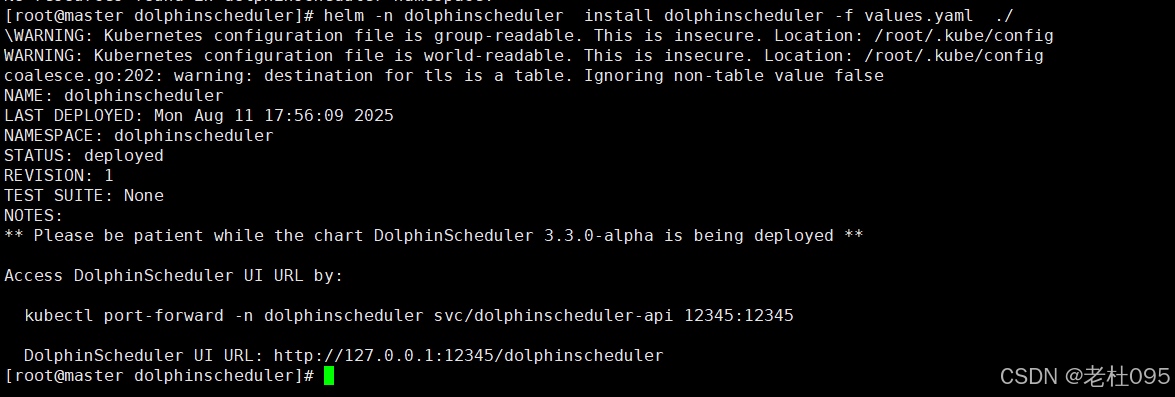
(3)、查看安装进度
[root@master dolphinscheduler]# kubectl get all -n dolphinscheduler
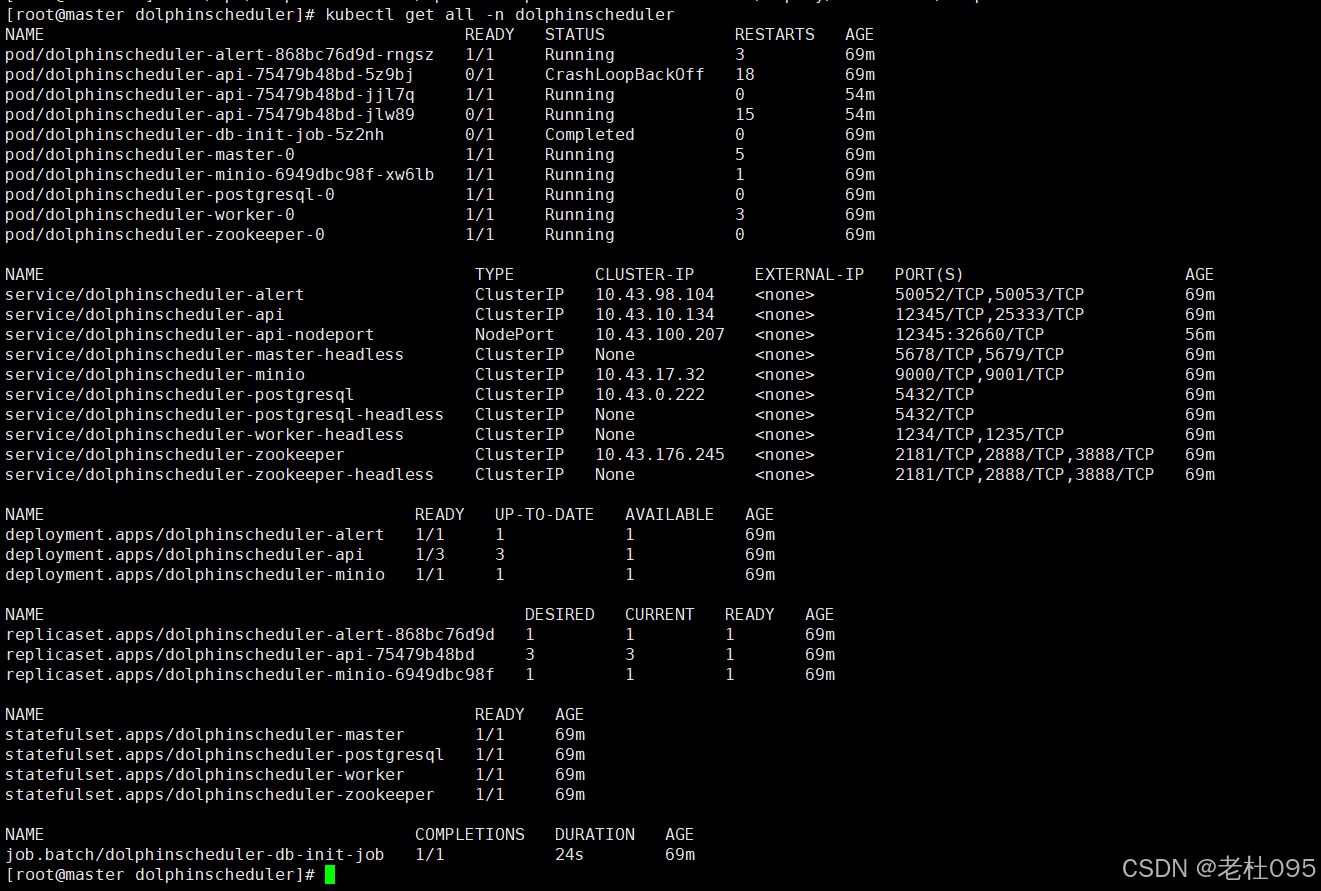
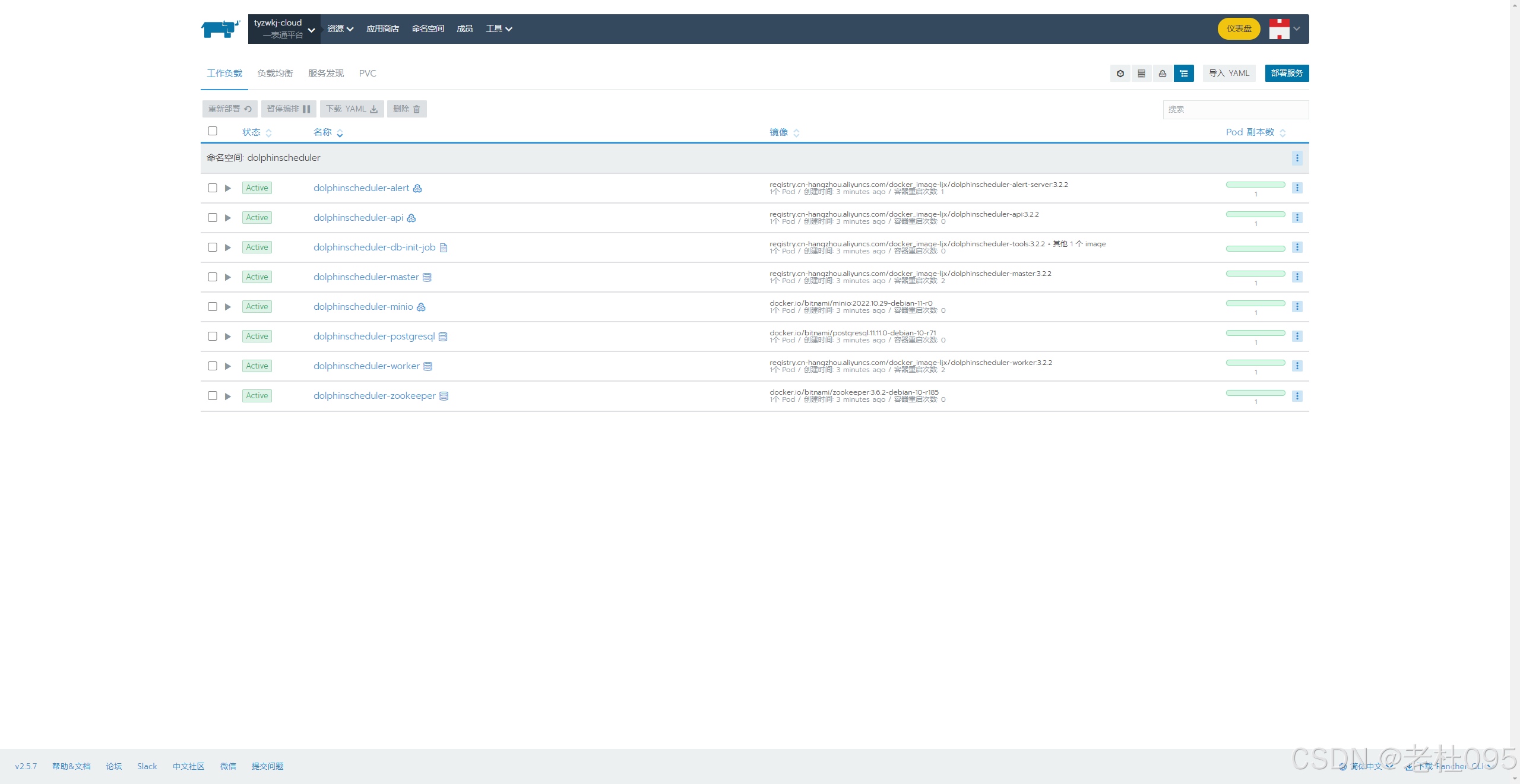
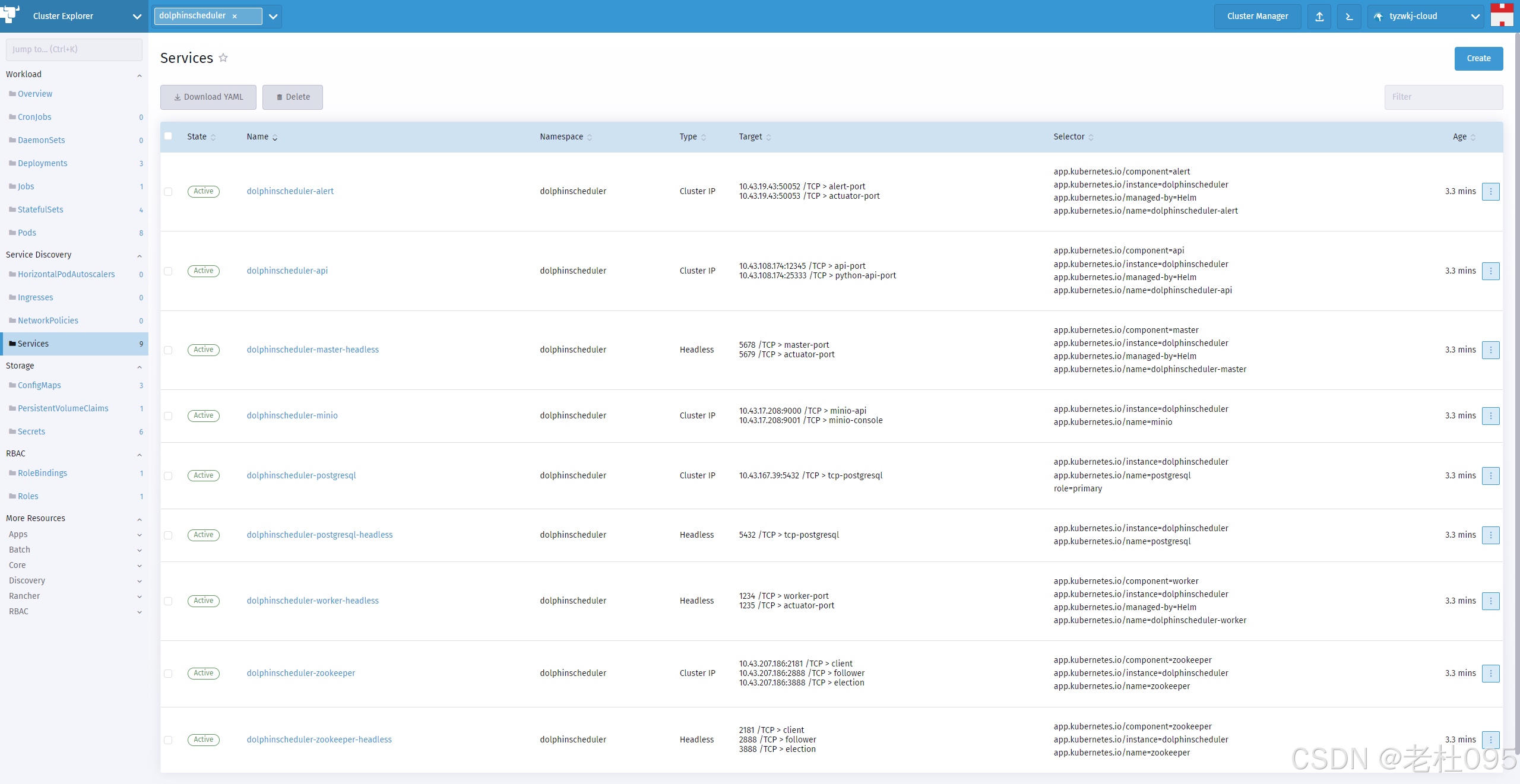
(4)、添加ingress配置实现访问ui
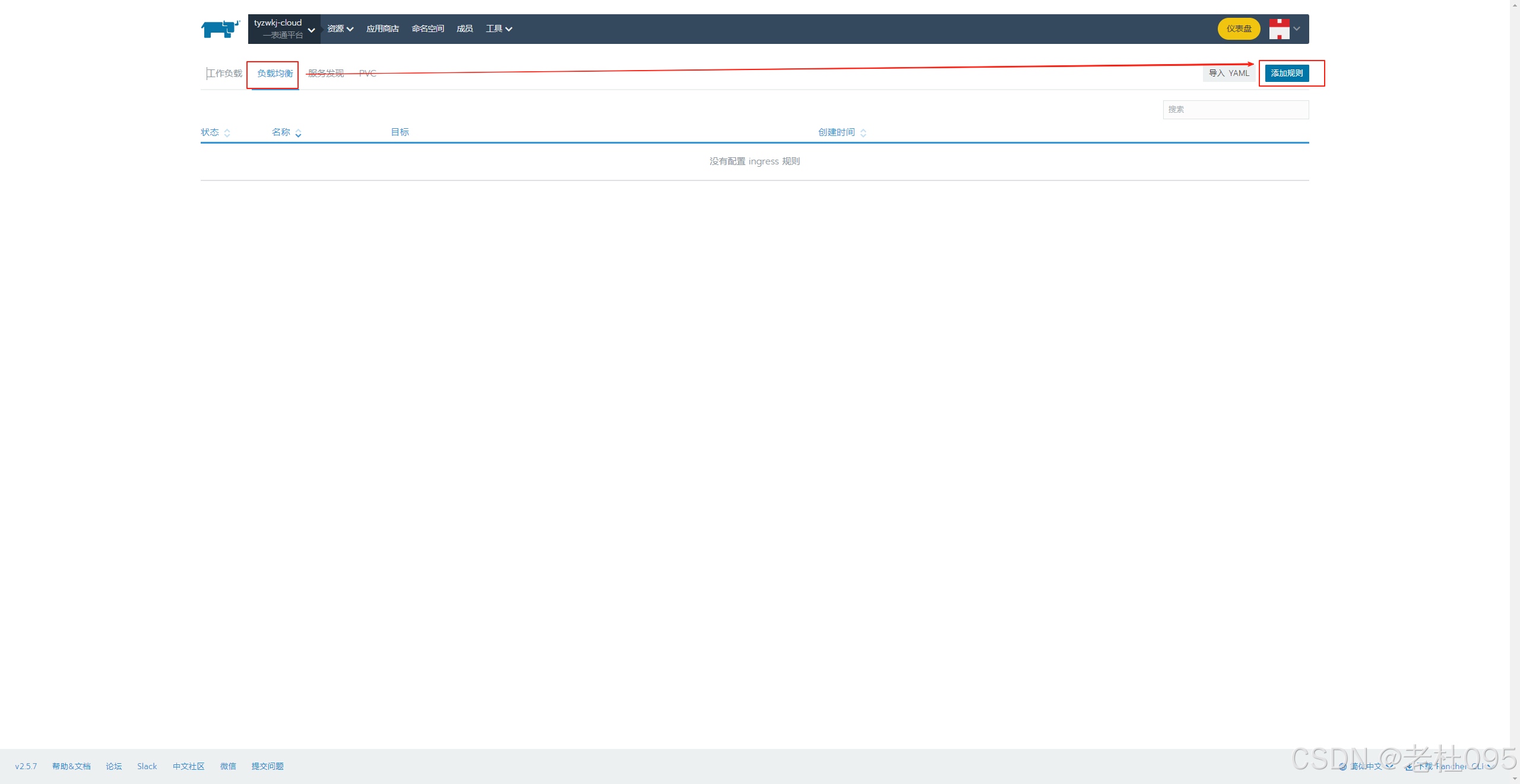
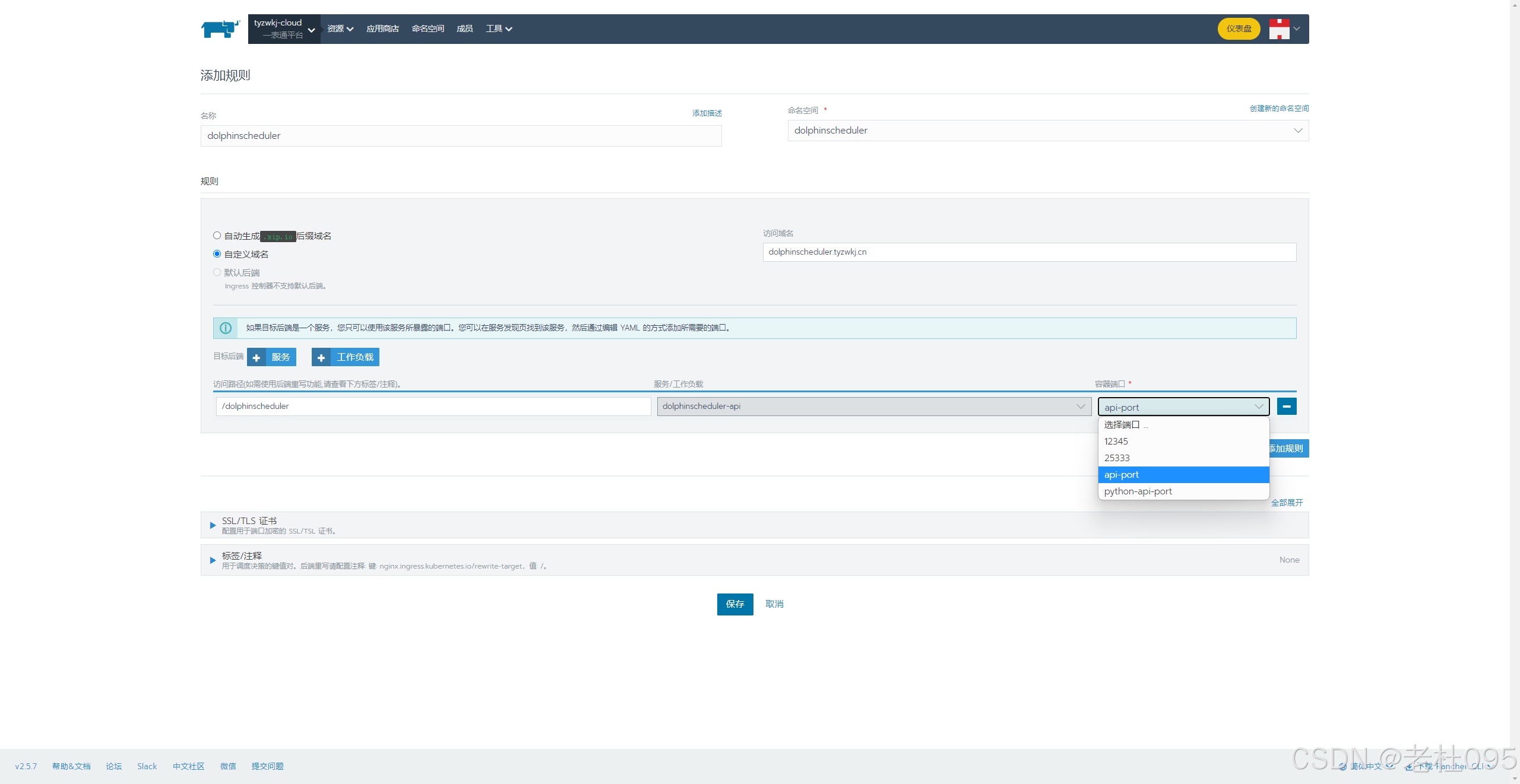
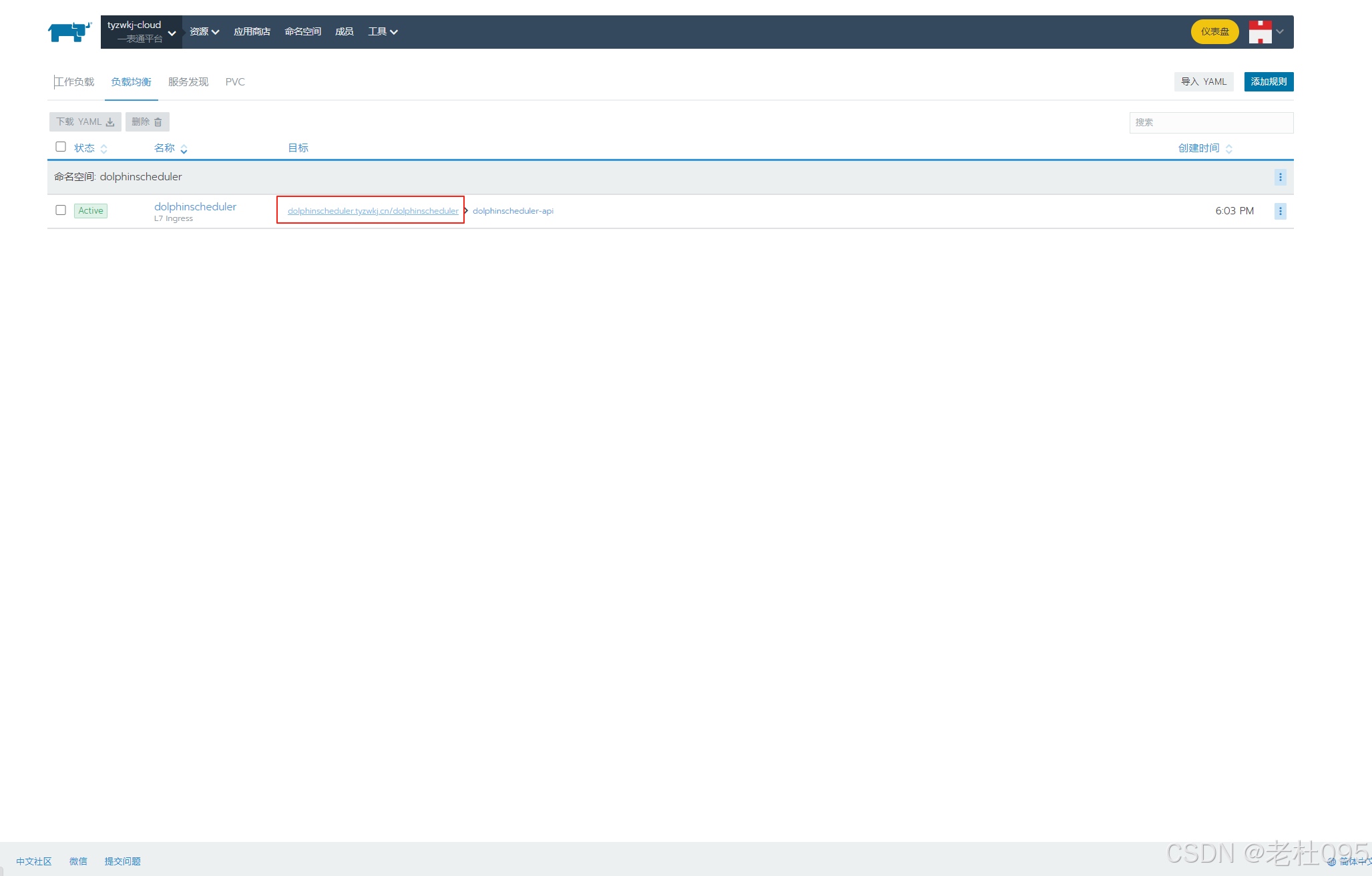
【重点】
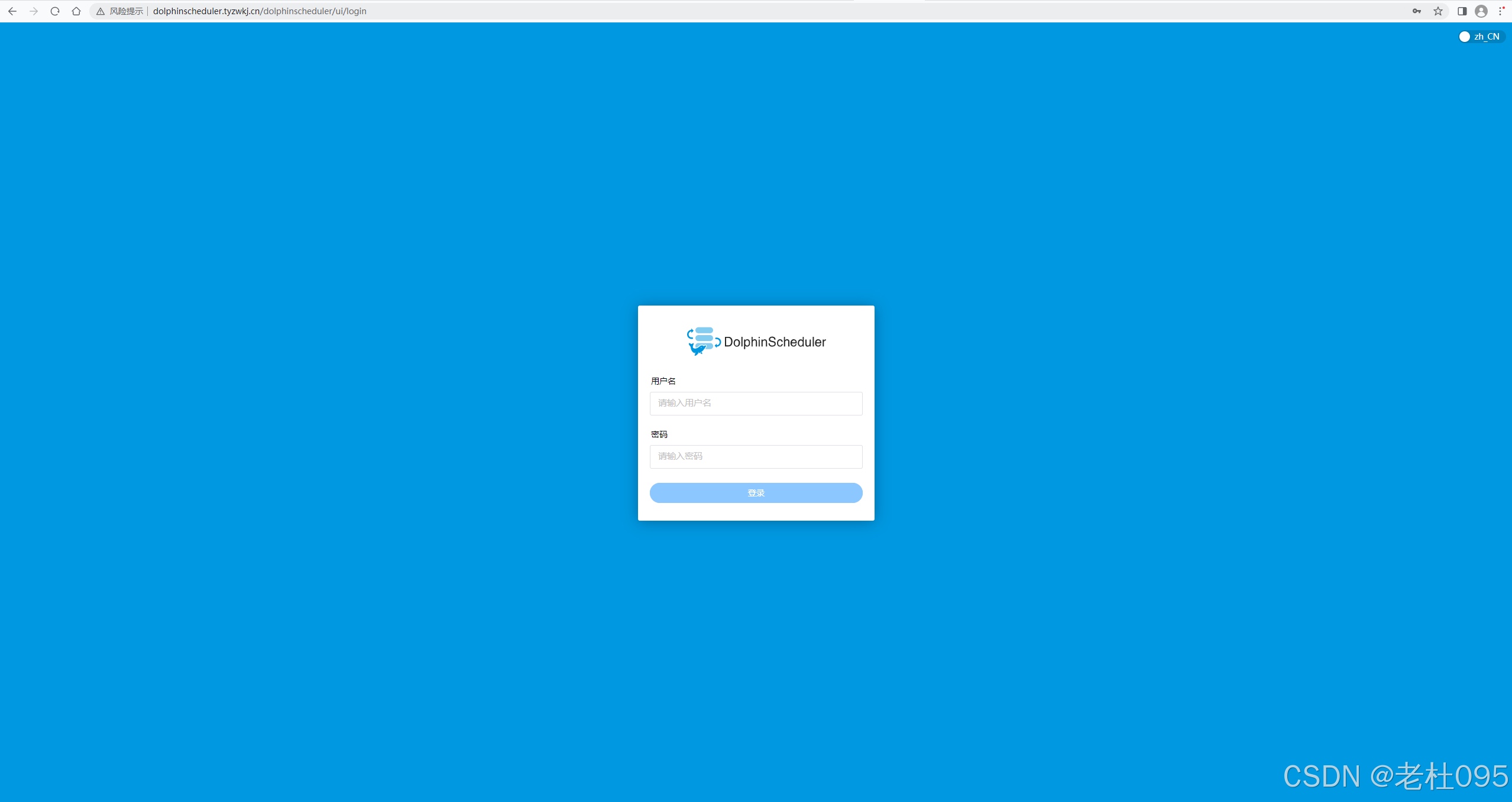
配置完成后,Dolphinscheduler管理端的UI访问地址为: http://dolphinscheduler.tyzwkj.cn/dolphinscheduler/ui/, 但是此时由于dolphinscheduler.tyzwkj.cn自定义域名还不能自动解析,需要在本地hosts文件中添加路由后才可以访问。
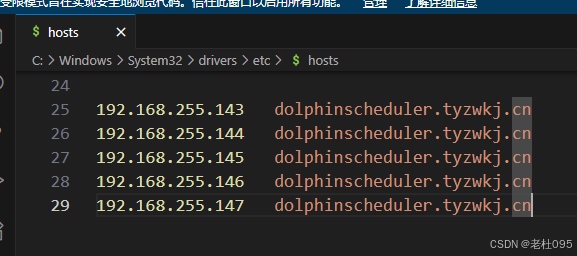
配置完hosts后在浏览器中输入http://dolphinscheduler.tyzwkj.cn/dolphinscheduler/ui/
用户名:admin
密码:dolphinscheduler123
结束,以上就是通过k8s部署Apache Dolphinscheduler集群的全部内容。
原文链接:https://blog.csdn.net/dyj095/article/details/150106792