作者:Ricardo Ferreira
编译:Debra Chen
假设你把客户数据存储在 Amazon DynamoDB 中,作为应用的唯一数据源(single source of truth)。但如今你需要同样的数据放在 Redis 里,进行快速缓存、实时分析,或是为向量搜索推荐引擎赋能。举例来说,DynamoDB 中这张名为 mySourceTable 的表当前包含两条数据记录。
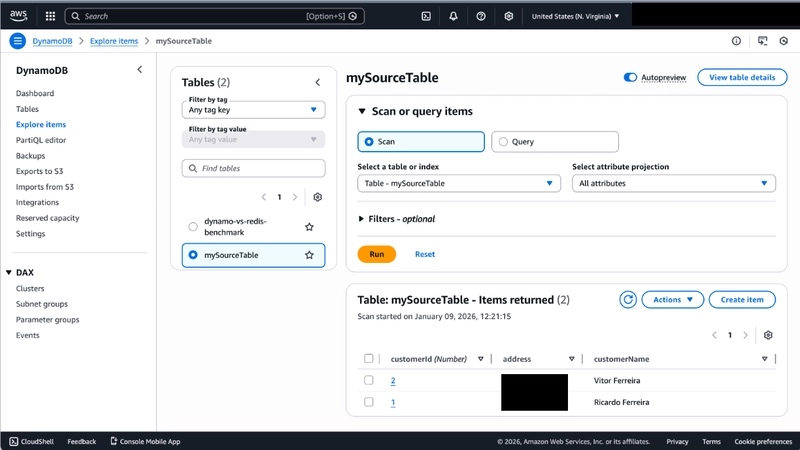
那么这个任务的挑战在哪呢?如何在不大写一堆代码的情况下,让两边保持同步?
就我个人而言,我最理想的方案是使用 Redis Data Integration(RDI),但遗憾的是,在撰写本文时,RDI 还不支持把 Amazon DynamoDB 作为数据源。这就让开发者只剩下两个选择:自己编写复杂的数据集成管道,或者投入昂贵(而且往往溢价过高)的 ETL 解决方案。这两个选项都不怎么让人满意。
但还有另一条路。
那就是 Apache ——一个开源数据集成项目,它让数据同步变得像写一个配置文件一样简单。在这篇博客中,我会深入介绍这个项目,并一步步讲解如何把数据从 Amazon DynamoDB 同步到 Redis。
Apache SeaTunnel:你的开源数据管道好帮手
Apache SeaTunnel 是一个多模态、高性能、分布式的海量数据集成工具,同时支持批处理和流式两种模式。你可以把它想象成你数据系统的"万能翻译官"——它精通 DynamoDB、Redis 以及其他 100 多种数据系统。
在这个场景下,SeaTunnel 的突出优势在于:
你可以用两种不同的配置方式使用 SeaTunnel:单机模式(standalone),用于一次性的数据搬运;或者集群模式(cluster),它能搭建一套常驻在线的数据管道基础设施,随时准备执行新任务。
方案一:快速上手(单机模式)
这个方案非常适合一次性迁移、本地开发或定时批处理任务。一条命令,搞定一切。
第一步,创建你的管道配置文件(jobs/my.config):
env { parallelism = 1 job.mode = "BATCH"}source { Amazondynamodb { url = "http://dynamodb.us-east-1.amazonaws.com" region = "us-east-1" access_key_id = "YOUR_ACCESS_KEY" secret_access_key = "YOUR_SECRET_KEY" table = "mySourceTable" schema = { fields { customerId = int customerName = string address = string } } }}sink { Redis { host = host.docker.internal # 或者你的 Redis 主机地址 port = 6379 support_custom_key = true key = "customer:{customerId}" data_type = hash }}用一条 Docker 命令即可运行:
docker run --rm -it \ -v $(pwd)/jobs:/config \ apache/seatunnel:2.3.12 \ ./bin/seatunnel.sh -m local -c /config/my.config
这条命令会启动一个新容器,里面运行一个单机模式 SeaTunnel 实例,执行 my.config 文件中描述的任务。你会看到类似下面的输出:
2026-01-09 16:57:50,786 INFO [c.h.i.c.AbstractConfigLocator ] [main] - Loading configuration '/opt/seatunnel/config/seatunnel.yaml' from System property 'seatunnel.config'2026-01-09 16:57:50,788 INFO [c.h.i.c.AbstractConfigLocator ] [main] - Using configuration file at /opt/seatunnel/config/seatunnel.yaml2026-01-09 16:57:50,789 INFO [o.a.s.e.c.c.SeaTunnelConfig ] [main] - seatunnel.home is /opt/seatunnel2026-01-09 16:57:50,830 INFO [amlSeaTunnelDomConfigProcessor] [main] - Dynamic slot is enabled, the schedule strategy is set to REJECT2026-01-09 16:57:50,830 INFO [c.h.i.c.AbstractConfigLocator ] [main] - Loading configuration '/opt/seatunnel/config/hazelcast.yaml' from System property 'hazelcast.config'2026-01-09 16:57:50,830 INFO [c.h.i.c.AbstractConfigLocator ] [main] - Using configuration file at /opt/seatunnel/config/hazelcast.yaml2026-01-09 16:57:50,962 INFO [c.h.i.c.AbstractConfigLocator ] [main] - Loading configuration '/opt/seatunnel/config/hazelcast-client.yaml' from System property 'hazelcast.client.config'2026-01-09 16:57:50,962 INFO [c.h.i.c.AbstractConfigLocator ] [main] - Using configuration file at /opt/seatunnel/config/hazelcast-client.yaml2026-01-09 16:57:50,985 WARN [c.h.i.AddressPicker ] [main] - [LOCAL] [seatunnel-420804] [5.1] You configured your member address as host name. Please be aware of that your dns can be spoofed. Make sure that your dns configurations are correct.2026-01-09 16:57:50,985 INFO [c.h.i.AddressPicker ] [main] - [LOCAL] [seatunnel-420804] [5.1] Resolving domain name 'localhost' to address(es): [127.0.0.1, 0:0:0:0:0:0:0:1]2026-01-09 16:57:50,986 INFO [c.h.i.AddressPicker ] [main] - [LOCAL] [seatunnel-420804] [5.1] Interfaces is disabled, trying to pick one address from TCP-IP config addresses: [localhost/127.0.0.1, localhost/0:0:0:0:0:0:0:1]SLF4J: Failed to load class "org.slf4j.impl.StaticLoggerBinder".SLF4J: Defaulting to no-operation (NOP) logger implementationSLF4J: See http://www.slf4j.org/codes.html#StaticLoggerBinder for further details.2026-01-09 16:57:51,189 INFO [o.a.s.e.s.SeaTunnelServer ] [main] - SeaTunnel server start...2026-01-09 16:57:51,191 INFO [c.h.system ] [main] - [localhost]:5801 [seatunnel-420804] [5.1] Based on Hazelcast IMDG version: 5.1.0 (20220228 - 21f20e7)2026-01-09 16:57:51,191 INFO [c.h.system ] [main] - [localhost]:5801 [seatunnel-420804] [5.1] Cluster name: seatunnel-4208042026-01-09 16:57:51,191 INFO [c.h.system ] [main] - [localhost]:5801 [seatunnel-420804] [5.1] _____ _____ _ / ___| |_ _| | |\ `--. ___ __ _ | | _ _ _ __ _ __ ___ | | `--. \ / _ \ / _` | | | | | | || '_ \ | '_ \ / _ \| |/\__/ /| __/| (_| | | | | |_| || | | || | | || __/| |\____/ \___| \__,_| \_/ \__,_||_| |_||_| |_| \___||_|2026-01-09 16:57:51,191 INFO [c.h.system ] [main] - [localhost]:5801 [seatunnel-420804] [5.1] Copyright © 2021-2024 The Apache Software Foundation. Apache SeaTunnel, SeaTunnel, and its feather logo are trademarks of The Apache Software Foundation.2026-01-09 16:57:51,191 INFO [c.h.system ] [main] - [localhost]:5801 [seatunnel-420804] [5.1] Integrity Checker is disabled. Fail-fast on corrupted executables will not be performed.To enable integrity checker do one of the following: - Change member config using Java API: config.setIntegrityCheckerEnabled(true); - Change XML/YAML configuration property: Set hazelcast.integrity-checker.enabled to true - Add system property: -Dhz.integritychecker.enabled=true (for Hazelcast embedded, works only when loading config via Config.load) - Add environment variable: HZ_INTEGRITYCHECKER_ENABLED=true (recommended when running container image. For Hazelcast embedded, works only when loading config via Config.load)2026-01-09 16:57:51,193 INFO [c.h.system ] [main] - [localhost]:5801 [seatunnel-420804] [5.1] The Jet engine is disabled.To enable the Jet engine on the members, do one of the following: - Change member config using Java API: config.getJetConfig().setEnabled(true) - Change XML/YAML configuration property: Set hazelcast.jet.enabled to true - Add system property: -Dhz.jet.enabled=true (for Hazelcast embedded, works only when loading config via Config.load) - Add environment variable: HZ_JET_ENABLED=true (recommended when running container image. For Hazelcast embedded, works only when loading config via Config.load)2026-01-09 16:57:51,331 INFO [c.h.s.security ] [main] - [localhost]:5801 [seatunnel-420804] [5.1] Enable DEBUG/FINE log level for log category com.hazelcast.system.security or use -Dhazelcast.security.recommendations system property to see