DolphinScheduler提供了一套完整且规范的RESTful API接口体系,为开发者提供了强大的集成和扩展能力。该API体系基于Spring Boot框架构建,采用标准的RESTful设计原则,支持Swagger文档自动生成,具备完善的认证授权机制和统一的错误处理体系。
DolphinScheduler的API架构采用分层设计模式,整体架构如下:

DolphinScheduler API包含20多个核心控制器,覆盖了系统的所有功能模块:

所有API接口都遵循统一的响应格式规范:
{ "code": 0, "msg": "success", "data": { // 业务数据内容 }}响应状态码说明:

DolphinScheduler支持多种认证方式:

支持两种认证模式:
密码认证:基于用户名密码的传统认证方式
LDAP认证:集成企业级LDAP身份验证
API采用统一的异常处理机制:
@RestControllerAdvicepublic class ApiExceptionHandler { @ExceptionHandler(Exception.class) public Result exceptionHandler(Exception e, HandlerMethod hm) { ApiException ce = hm.getMethodAnnotation(ApiException.class); if (ce == null) { return Result.errorWithArgs(Status.INTERNAL_SERVER_ERROR_ARGS, e.getMessage()); } return Result.error(ce.value()); }}系统集成Swagger2和SwaggerBootstrapUI,自动生成API文档:
访问路径:/swagger-ui.html
支持在线测试接口
完整的参数说明和示例
实时更新的接口文档
@PostMapping()@ApiOperation(value = "create", notes = "CREATE_PROJECT_NOTES")@ApiException(CREATE_PROJECT_ERROR)public Result createProject(@RequestAttribute User loginUser, @RequestParam String projectName, @RequestParam(required = false) String description) { Map<String, Object> result = projectService.createProject(loginUser, projectName, description); return returnDataList(result);}启动工作流实例:
@PostMapping("start-process-instance")@ApiOperation(value = "startProcessInstance", notes = "RUN_PROCESS_INSTANCE_NOTES")public Result startProcessInstance(@PathVariable long projectCode, @RequestParam long processDefinitionCode, @RequestParam FailureStrategy failureStrategy, @RequestParam WarningType warningType) { // 业务逻辑处理}认证头信息:所有接口调用都需要携带有效的Session或Token
参数验证:严格按照Swagger文档中的参数要求传递数据
错误处理:正确处理各种业务状态码和错误信息
性能优化:合理使用分页查询,避免大数据量返回
异步操作:长时间操作建议使用异步调用方式
开发者可以通过以下方式扩展API功能:
新增控制器:继承BaseController,使用标准注解规范
自定义服务:实现业务逻辑,注入到控制器中
添加状态码:在Status枚举中定义新的错误状态
集成认证:实现Authenticator接口支持新的认证方式
DolphinScheduler的RESTful API体系设计规范、扩展性强,为系统集成和二次开发提供了坚实的基础架构支持。通过完善的文档和统一的规范,开发者可以快速上手并进行定制化开发。
Apache DolphinScheduler提供了强大的Java SDK集成能力,允许开发者通过编程方式与调度系统进行交互。本指南将详细介绍如何使用Java SDK进行工作流定义、任务管理、调度执行等操作。
在开始使用Java SDK之前,需要确保项目已正确配置相关依赖。DolphinScheduler的Java SDK主要通过Maven进行依赖管理:
<dependency> <groupId>org.apache.dolphinscheduler</groupId> <artifactId>dolphinscheduler-client</artifactId> <version>3.0.0</version></dependency> <dependency> <groupId>org.apache.dolphinscheduler</groupId> <artifactId>dolphinscheduler-common</artifactId> <version>3.0.0</version></dependency>
DolphinScheduler Java SDK提供了丰富的API接口,主要分为以下几类:

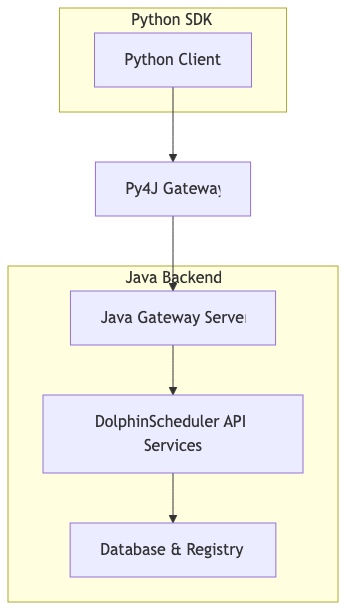
DolphinScheduler采用Py4J框架实现Python与Java的跨语言通信,其架构如下:

工作流创建与提交
以下示例展示如何通过Java SDK创建和提交一个简单的工作流:
// 初始化网关连接GatewayServer gateway = new GatewayServer(new PythonGatewayServer());gateway.start(); // 创建工作流定义ProcessDefinition processDefinition = new ProcessDefinition();processDefinition.setName("daily_etl_workflow");processDefinition.setDescription("Daily ETL Data Processing");processDefinition.setProjectName("data_engineering");processDefinition.setTenantCode("tenant_001"); // 添加Shell任务ShellTask shellTask = new ShellTask();shellTask.setName("data_extraction");shellTask.setCommand("python /scripts/extract_data.py");shellTask.setWorkerGroup("default"); // 添加SQL任务SqlTask sqlTask = new SqlTask();sqlTask.setName("data_transformation");sqlTask.setDatasourceName("hive_prod");sqlTask.setSql("INSERT INTO table_dest SELECT * FROM table_src"); // 设置任务依赖关系processDefinition.addTask(shellTask);processDefinition.addTask(sqlTask);processDefinition.setTaskRelation(shellTask, sqlTask); // 提交工作流long processDefinitionCode = processDefinitionService .createProcessDefinition(user, projectCode, processDefinition); // 发布工作流processDefinitionService.releaseProcessDefinition( user, projectCode, processDefinitionCode, ReleaseState.ONLINE);工作流调度执行
// 立即执行工作流Map<String, Object> result = executorService.execProcessInstance( user, projectCode, processDefinitionCode, null, // scheduleTime null, // execType FailureStrategy.CONTINUE, null, // startNodeList TaskDependType.TASK_POST, WarningType.NONE, 0, // warningGroupId RunMode.RUN_MODE_SERIAL, Priority.MEDIUM, "default", // workerGroup -1L, // environmentCode 3600, // timeout null, // startParams null // expectedParallelismNumber); // 解析执行结果if (result.get(Constants.STATUS) == Status.SUCCESS) { int processInstanceId = (int) result.get(Constants.DATA_LIST); logger.info("Process instance started with ID: {}", processInstanceId);}定时调度配置
// 创建定时调度Schedule schedule = new Schedule();schedule.setProcessDefinitionCode(processDefinitionCode);schedule.setCrontab("0 0 2 * * ?"); // 每天凌晨2点执行schedule.setFailureStrategy(FailureStrategy.CONTINUE);schedule.setWarningType(WarningType.ALL);schedule.setWarningGroupId(1);schedule.setProcessInstancePriority(Priority.MEDIUM); Map<String, Object> scheduleResult = schedulerService.insertSchedule( user, projectCode, processDefinitionCode, schedule);参数化工作流
DolphinScheduler支持全局参数和局部参数传递:
// 设置全局参数Map<String, String> globalParams = new HashMap<>();globalParams.put("business_date", "${system.biz.date}");globalParams.put("input_path", "/data/input/${business_date}");globalParams.put("output_path", "/data/output/${business_date}"); processDefinition.setGlobalParams(globalParams); // 任务级参数shellTask.setLocalParams(Collections.singletonList( new Property("file_count", "IN", "VARCHAR", "10")));条件分支与流程控制
// 创建条件任务ConditionsTask conditionsTask = new ConditionsTask();conditionsTask.setName("check_data_quality");conditionsTask.setCondition("${data_quality} > 0.9"); // 成功分支ShellTask successTask = new ShellTask();successTask.setName("load_to_dw");successTask.setCommand("python load_datawarehouse.py"); // 失败分支ShellTask failureTask = new ShellTask();failureTask.setName("send_alert");failureTask.setCommand("python send_alert.py"); // 设置条件分支processDefinition.addTask(conditionsTask);processDefinition.addTask(successTask);processDefinition.addTask(failureTask);processDefinition.setConditionRelation(conditionsTask, successTask, failureTask);资源文件管理
// 上传资源文件ResourceComponent resource = new ResourceComponent();resource.setName("etl_script.py");resource.setDescription("ETL Python Script");resource.setContent(Files.readAllBytes(Paths.get("scripts/etl_script.py")));resource.setType(ResourceType.FILE); Result uploadResult = resourcesService.createResource( user, resource.getName(), resource.getDescription(), resource.getContent(), ResourceType.FILE, 0, // pid "/"); // 在任务中引用资源文件shellTask.setResourceList(Collections.singletonList( new ResourceInfo("etl_script.py", ResourceType.FILE)));异常处理机制
try { // 工作流操作 long processDefinitionCode = processDefinitionService .createProcessDefinition(user, projectCode, processDefinition); } catch (ServiceException e) { logger.error("Failed to create process definition: {}", e.getMessage()); // 根据错误码进行特定处理 if (e.getCode() == Status.PROCESS_DEFINITION_NAME_EXIST.getCode()) { logger.warn("Process definition already exists, updating instead..."); // 更新逻辑 }}执行状态监控
// 查询工作流实例状态ProcessInstance processInstance = processInstanceService.queryProcessInstanceById( user, projectCode, processInstanceId); // 监控任务执行状态List<TaskInstance> taskInstances = taskInstanceService.queryTaskListPaging( user, projectCode, processInstanceId, null, // processInstanceName null, // taskName null, // executorName null, // startDate null, // endDate null, // searchVal null, // stateType null, // host 1, // pageNo 100 // pageSize); // 实时日志查看String taskLog = loggerService.queryLog( user, taskInstanceId, 0, // skipLineNum 100 // limit);
批量操作优化
// 批量生成任务编码Map<String, Object> codeResult = taskDefinitionService.genTaskCodeList(100);List<Long> taskCodes = (List<Long>) codeResult.get(Constants.DATA_LIST); // 批量创建任务for (int i = 0; i < taskCodes.size(); i++) { ShellTask task = new ShellTask(); task.setCode(taskCodes.get(i)); task.setName("batch_task_" + i); task.setCommand("echo 'Task " + i + "'"); processDefinition.addTask(task);}连接池配置
# application.yml 配置dolphinscheduler: client: pool: max-total: 50 max-idle: 10 min-idle: 5 max-wait-millis: 30000
异步处理模式
// 异步提交工作流CompletableFuture<Long> future = CompletableFuture.supplyAsync(() -> { return processDefinitionService.createProcessDefinition( user, projectCode, processDefinition);}); future.thenAccept(processDefinitionCode -> { logger.info("Process definition created asynchronously: {}", processDefinitionCode); // 后续处理逻辑}).exceptionally(ex -> { logger.error("Failed to create process definition asynchronously", ex); return null;});认证与授权
// 使用访问令牌认证String accessToken = "your-access-token";User user = usersService.queryUserByToken(accessToken); // 权限验证boolean hasPermission = usersService.hasProjectPerm( user, projectCode, "project_operator"); if (!hasPermission) { throw new SecurityException("Insufficient permissions for project operation");}敏感数据保护
// 使用加密参数String encryptedParam = PasswordUtils.encryptPassword("sensitive_data"); // 安全的数据源配置DataSource datasource = new DataSource();datasource.setName("prod_database");datasource.setType(DbType.MYSQL);datasource.setConnectionParams(PasswordUtils.encryptPassword( "jdbc:mysql://host:3306/db?user=admin&password=secret"));日志配置
<!-- log4j2.xml 配置 --><Logger name="org.apache.dolphinscheduler" level="DEBUG" additivity="false"> <AppenderRef ref="Console"/> <AppenderRef ref="File"/></Logger>
常见问题处理
// 连接超时处理try { gateway.entryPoint.createOrUpdateProcessDefinition(...);} catch (Py4JNetworkException e) { logger.warn("Gateway connection timeout, retrying..."); // 重试逻辑 retryOperation();} // 数据序列化异常try { String jsonParams = objectMapper.writeValueAsString(taskParams);} catch (JsonProcessingException e) { logger.error("JSON serialization failed: {}", e.getMessage()); // 使用简化参数 jsonParams = "{}";}通过本指南,您可以全面了解DolphinScheduler Java SDK的集成方式和最佳实践。这些示例代码和模式可以帮助您构建可靠、高效的数据调度解决方案。
Apache DolphinScheduler 提供了完整的 RESTful API 接口,支持通过编程方式对工作流进行创建、更新、查询和管理操作。这种编程式管理方式为自动化运维、CI/CD集成以及大规模工作流部署提供了强大的技术支撑。
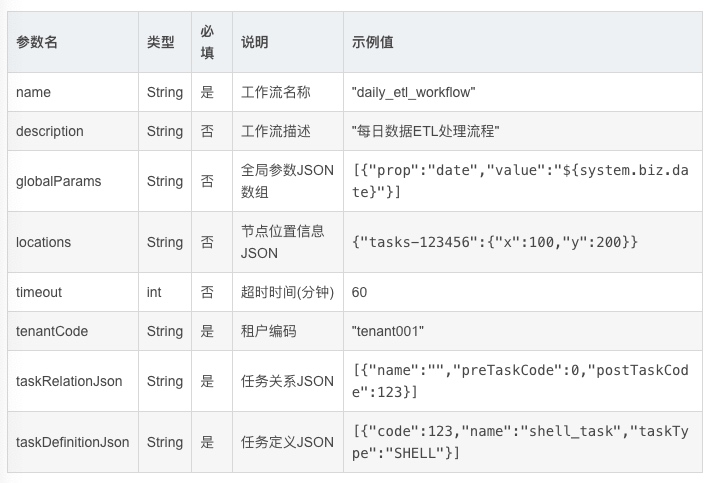
DolphinScheduler 的核心创建工作流 API 提供了丰富的参数配置能力,支持完整的工作流定义:
@PostMapping()@ResponseStatus(HttpStatus.CREATED)public Result createProcessDefinition( @RequestAttribute(value = Constants.SESSION_USER) User loginUser, @PathVariable long projectCode, @RequestParam(value = "name", required = true) String name, @RequestParam(value = "description", required = false) String description, @RequestParam(value = "globalParams", required = false, defaultValue = "[]") String globalParams, @RequestParam(value = "locations", required = false) String locations, @RequestParam(value = "timeout", required = false, defaultValue = "0") int timeout, @RequestParam(value = "tenantCode", required = true) String tenantCode, @RequestParam(value = "taskRelationJson", required = true) String taskRelationJson, @RequestParam(value = "taskDefinitionJson", required = true) String taskDefinitionJson)

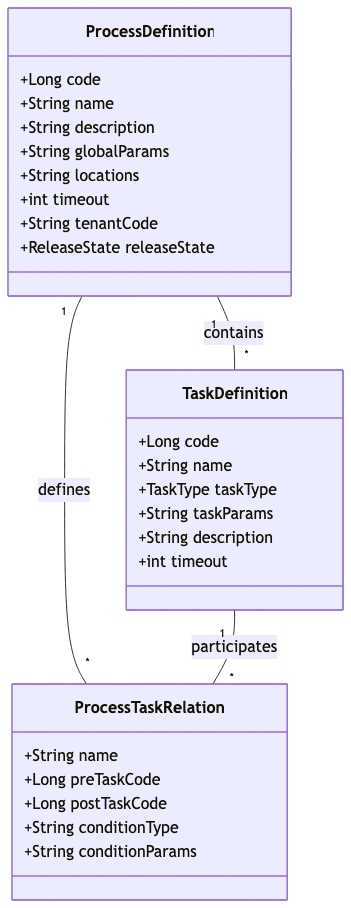
DolphinScheduler 的工作流采用分层数据结构设计,通过类图可以清晰展示其核心组件关系:

以下是一个完整的Java代码示例,展示如何通过API编程方式创建工作流:
public class WorkflowCreator { private static final String API_BASE = "http://dolphinscheduler-api:12345/dolphinscheduler"; private static final String TOKEN = "your-auth-token"; public String createDailyETLWorkflow(long projectCode, String tenantCode) { // 构建任务定义JSON String taskDefinitionJson = buildTaskDefinitions(); // 构建任务关系JSON String taskRelationJson = buildTaskRelations(); // 构建请求参数 Map<String, Object> params = new HashMap<>(); params.put("name", "daily_etl_pipeline"); params.put("description", "Daily data extraction and loading workflow"); params.put("globalParams", "[{\"prop\":\"biz_date\",\"value\":\"${system.biz.date}\"}]"); params.put("timeout", 120); params.put("tenantCode", tenantCode); params.put("taskRelationJson", taskRelationJson); params.put("taskDefinitionJson", taskDefinitionJson); // 调用API String url = String.format("%s/projects/%d/process-definition", API_BASE, projectCode); return HttpClientUtils.post(url, params, TOKEN); } private String buildTaskDefinitions() { return "[" + "{\"code\":1001,\"name\":\"extract_mysql_data\",\"taskType\":\"SQL\"," + "\"taskParams\":\"{\\\"type\\\":\\\"MYSQL\\\",\\\"sql\\\":\\\"SELECT * FROM source_table WHERE dt='${biz_date}'\\\"}\"," + "\"description\":\"Extract data from MySQL\",\"timeout\":30}," + "{\"code\":1002,\"name\":\"transform_data\",\"taskType\":\"SPARK\"," + "\"taskParams\":\"{\\\"mainClass\\\":\\\"com.etl.Transformer\\\",\\\"deployMode\\\":\\\"cluster\\\"}\"," + "\"description\":\"Transform extracted data\",\"timeout\":60}," + "{\"code\":1003,\"name\":\"load_to_hive\",\"taskType\":\"HIVE\"," + "\"taskParams\":\"{\\\"hiveCliTaskExecutionType\\\":\\\"SCRIPT\\\",\\\"hiveSqlScript\\\":\\\"INSERT INTO target_table SELECT * FROM temp_table\\\"}\"," + "\"description\":\"Load data to Hive\",\"timeout\":30}" + "]"; } private String buildTaskRelations() { return "[" + "{\"name\":\"\",\"preTaskCode\":0,\"postTaskCode\":1001}," + "{\"name\":\"\",\"preTaskCode\":1001,\"postTaskCode\":1002}," + "{\"name\":\"\",\"preTaskCode\":1002,\"postTaskCode\":1003}" + "]"; }}除了创建工作流,DolphinScheduler 还提供了完整的管理API:
查询工作流列表
@GetMapping()public Result queryProcessDefinitionListPaging( @RequestAttribute(value = Constants.SESSION_USER) User loginUser, @PathVariable long projectCode, @RequestParam(value = "searchVal", required = false) String searchVal, @RequestParam(value = "pageNo") Integer pageNo, @RequestParam(value = "pageSize") Integer pageSize)
更新工作流定义
@PutMapping(value = "/{code}")public Result updateProcessDefinition( @RequestAttribute(value = Constants.SESSION_USER) User loginUser, @PathVariable long projectCode, @RequestParam(value = "name", required = true) String name, @PathVariable(value = "code", required = true) long code, // ... 其他参数与创建API类似 @RequestParam(value = "releaseState", required = false) ReleaseState releaseState)发布/下线工作流
@PostMapping(value = "/release")public Result releaseProcessDefinition( @RequestAttribute(value = Constants.SESSION_USER) User loginUser, @PathVariable long projectCode, @RequestParam(value = "code") long code, @RequestParam(value = "releaseState") ReleaseState releaseState)
对于大规模工作流管理场景,DolphinScheduler 提供了批量操作API:
// 批量复制工作流@PostMapping(value = "/batch-copy")public Result copyProcessDefinition( @RequestAttribute(value = Constants.SESSION_USER) User loginUser, @PathVariable long projectCode, @RequestParam(value = "codes", required = true) String codes, @RequestParam(value = "targetProjectCode", required = true) long targetProjectCode) // 批量移动工作流 @PostMapping(value = "/batch-move")public Result moveProcessDefinition( @RequestAttribute(value = Constants.SESSION_USER) User loginUser, @PathVariable long projectCode, @RequestParam(value = "codes", required = true) String codes, @RequestParam(value = "targetProjectCode", required = true) long targetProjectCode) // 批量删除工作流@DeleteMapping(value = "/batch-delete")public Result batchDeleteProcessDefinition( @RequestAttribute(value = Constants.SESSION_USER) User loginUser, @PathVariable long projectCode, @RequestParam(value = "codes", required = true) String codes)
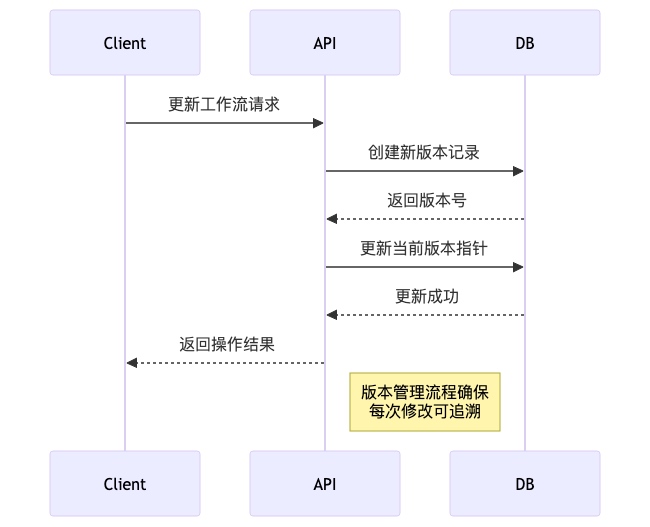
DolphinScheduler 支持工作流版本控制,每次修改都会生成新的版本:

版本查询API示例:
@GetMapping(value = "/{code}/versions")public Result queryProcessDefinitionVersions( @RequestAttribute(value = Constants.SESSION_USER) User loginUser, @PathVariable long projectCode, @RequestParam(value = "pageNo") int pageNo, @RequestParam(value = "pageSize") int pageSize, @PathVariable(value = "code") long code)编程式创建工作流时,需要正确处理各种异常情况:

参数验证: 在调用API前验证所有必填参数,特别是JSON格式的任务定义和关系数据
异常重试: 对于网络超时等临时性错误,实现重试机制
版本控制: 重要变更前备份当前工作流版本
权限管理: 确保API调用具有足够的项目操作权限
性能优化: 批量操作时合理设置分页大小,避免一次性加载过多数据
通过编程式API管理DolphinScheduler工作流,可以实现高度自动化的数据流水线部署和管理,大大提升数据工程团队的效率和运维质量。
DolphinScheduler作为现代化的数据调度平台,提供了丰富的API接口和灵活的扩展机制,能够与企业现有系统实现深度集成。通过RESTful API、Webhook回调、插件扩展等多种方式,DolphinScheduler可以与企业的监控系统、消息通知系统、数据平台等无缝对接。
DolphinScheduler提供了完善的认证和授权体系,支持多种集成方式:
Access Token认证
企业系统可以通过Access Token与DolphinScheduler API进行安全交互:
// 生成Access Token示例POST /access-tokensContent-Type: application/x-www-form-urlencoded userId=1001&expireTime=2024-12-31 23:59:59 // 使用Token调用APIGET /projects/1001/process-definitionAuthorization: Bearer {access_token}多租户支持
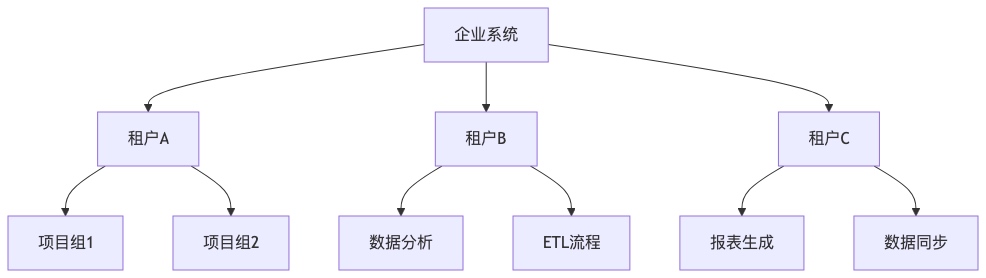
DolphinScheduler支持多租户架构,不同企业部门可以独立管理自己的工作流:

程序化工作流触发
企业系统可以通过API动态触发工作流执行:
// 启动工作流实例POST /projects/{projectCode}/executors/start-process-instanceContent-Type: application/x-www-form-urlencoded processDefinitionCode=12345&scheduleTime=2024-01-15 10:00:00&failureStrategy=END&warningType=ALL&workerGroup=default&timeout=3600批量任务调度
支持批量启动多个工作流,适用于数据补全或批量处理场景:
// 批量启动工作流POST /projects/{projectCode}/executors/batch-start-process-instanceContent-Type: application/x-www-form-urlencoded processDefinitionCodes=1001,1002,1003&failureStrategy=END&warningType=ALL工作流状态查询
企业监控系统可以实时获取工作流执行状态:
// 查询工作流实例列表GET /projects/{projectCode}/process-instance?pageNo=1&pageSize=20&stateType=RUNNING // 响应示例{ "code": 0, "msg": "success", "data": { "totalList": [ { "id": 1001, "name": "daily_etl", "state": "RUNNING", "startTime": "2024-01-15 09:00:00", "host": "worker-node-1" } ], "total": 1, "currentPage": 1, "totalPage": 1 }}任务日志集成
支持实时获取任务执行日志,便于故障排查和审计:
// 查看任务日志GET /projects/{projectCode}/log/detail?taskInstanceId=5001&skipLineNum=0&limit=100DolphinScheduler提供了灵活的告警插件机制,支持多种通知方式:
HTTP Webhook集成
通过HTTP告警插件,可以将告警信息推送到企业现有的监控系统:
# HTTP告警配置示例url: https://monitor.company.com/api/alertsrequestType: POSTheaderParams: '{"Content-Type": "application/json", "Authorization": "Bearer {api_key}"}'bodyParams: '{"alert_type": "dolphin_scheduler", "priority": "high"}'contentField: "message"自定义告警插件
企业可以开发自定义告警插件,实现与内部系统的深度集成:
// 自定义告警插件示例public class CustomAlertPlugin implements AlertChannel { @Override public AlertResult process(AlertInfo alertInfo) { // 与企业内部系统集成逻辑 AlertData data = alertInfo.getAlertData(); Map<String, String> params = alertInfo.getAlertParams(); // 调用企业API发送告警 return sendToEnterpriseSystem(data, params); }}多数据源支持
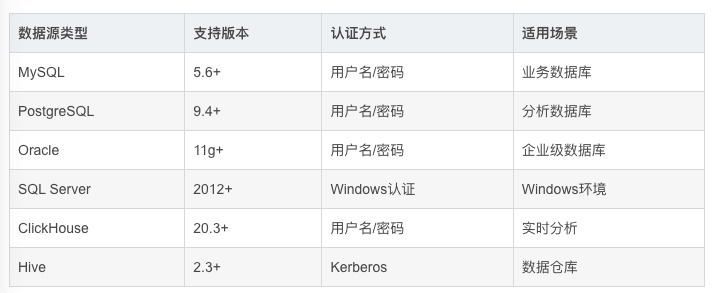
DolphinScheduler支持多种数据源类型,便于与企业现有数据平台集成:

数据源API管理
通过API动态管理数据源连接:
// 创建数据源POST /data-sourcesContent-Type: application/json { "name": "prod_mysql", "type": "MYSQL", "connectionParams": { "host": "mysql.prod.company.com", "port": 3306, "database": "business", "user": "etl_user", "password": "encrypted_password" }}统一资源管理
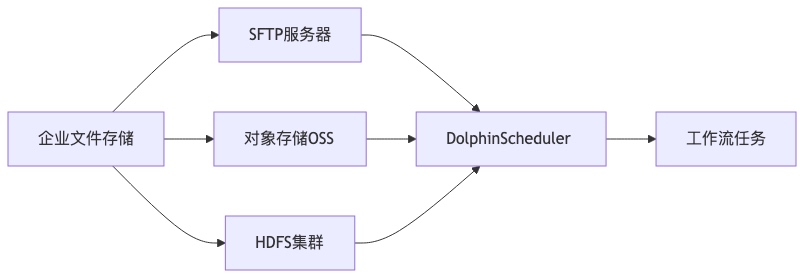
支持与企业现有的文件存储系统集成,实现资源文件的统一管理:

资源API操作
提供完整的资源文件CRUD操作API:
// 上传资源文件POST /resourcesContent-Type: multipart/form-data type=FILE&name=etl_script.py&file=@/path/to/script.py // 在线创建资源POST /resources/online-createContent-Type: application/x-www-form-urlencoded type=FILE&fileName=config.json&suffix=json&content={"key": "value"}LDAP/AD集成
支持与企业现有的LDAP或Active Directory系统集成,实现统一身份认证:
# LDAP配置示例security: authentication: type: LDAP ldap: urls: ldap://ldap.company.com:389 base-dn: dc=company,dc=com user-dn-pattern: uid={0},ou=people权限同步机制
通过API实现用户权限的自动化同步和管理:
// 查询用户权限GET /users/authed-project?userId=1001 // 授权用户访问项目POST /projects/{projectCode}/grantContent-Type: application/x-www-form-urlencoded userId=1001&permission=READ系统监控指标
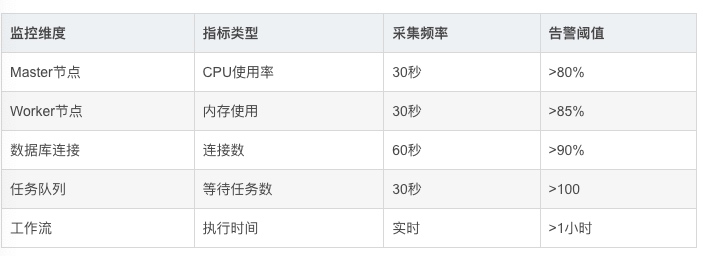
DolphinScheduler提供丰富的监控指标,便于与企业监控系统集成:

监控数据导出
支持通过API获取监控数据,便于集成到企业监控平台:
// 获取Master节点状态GET /monitor/masters // 获取Worker节点状态 GET /monitor/workers // 获取数据库状态GET /monitor/databases
自定义任务插件
企业可以开发自定义任务插件,扩展DolphinScheduler的功能:
// 自定义任务插件示例public class CustomTaskPlugin extends AbstractTask { @Override public AbstractParameters getParameters() { return new CustomParameters(); } @Override public TaskResult execute() { // 调用企业内部服务 return callEnterpriseService(); }}SPI扩展机制
DolphinScheduler基于SPI机制,支持灵活的扩展开发:

通过上述集成方案,企业可以充分利用DolphinScheduler的API和扩展能力,实现与现有系统的无缝对接,构建统一的数据调度和管理平台。
DolphinScheduler提供了强大而灵活的API体系,支持多种集成方式和扩展开发。通过RESTful API和Java SDK,开发者可以实现工作流的程序化创建、管理和监控,与企业现有系统无缝集成。文章详细介绍了认证授权、错误处理、资源管理、用户权限集成等关键功能,并提供了实际代码示例和最佳实践建议。
通过本文为我们可以看到,DolphinScheduler的扩展性使其能够适应各种企业环境,通过自定义插件和SPI机制,可以进一步扩展其功能,满足特定的业务需求。这些特性使DolphinScheduler成为构建现代化数据调度平台的理想选择。
原文链接:https://blog.csdn.net/gitblog_00756/article/details/150755498