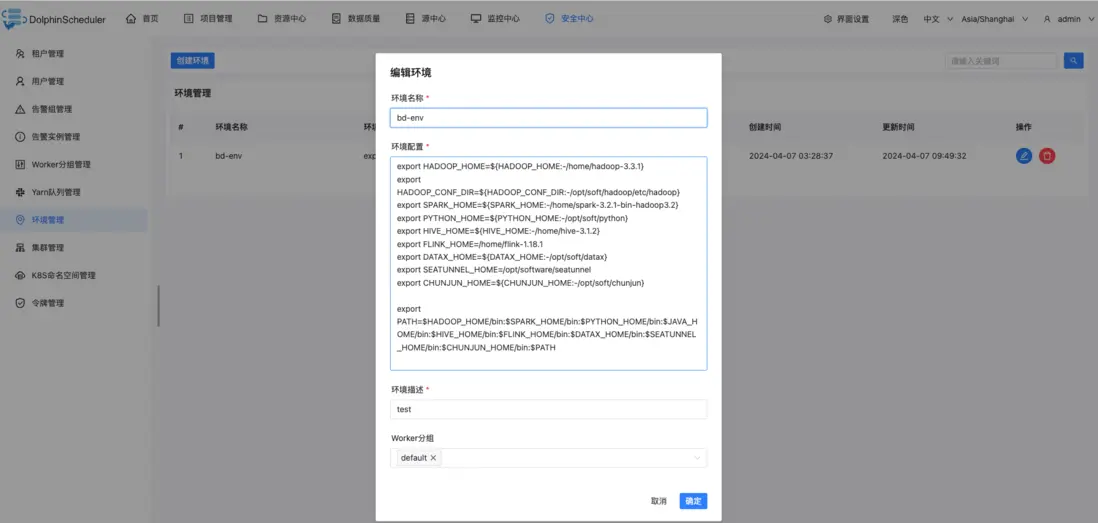
# The default env list will be load by Shell task, e.g. /etc/profile,~/.bash_profileshell.env_source_list=/etc/profile# The interceptor type of Shell task, e.g. bash, sh, cmdshell.interceptor.type=bash
public class ShellInterceptorBuilderFactory { private final static String INTERCEPTOR_TYPE = PropertyUtils.getString("shell.interceptor.type", "bash"); @SuppressWarnings("unchecked") public static IShellInterceptorBuilder newBuilder() { // TODO 默认的走的是这个逻辑 if (INTERCEPTOR_TYPE.equalsIgnoreCase("bash")) { return new BashShellInterceptorBuilder(); } if (INTERCEPTOR_TYPE.equalsIgnoreCase("sh")) { return new ShShellInterceptorBuilder(); } if (INTERCEPTOR_TYPE.equalsIgnoreCase("cmd")) { return new CmdShellInterceptorBuilder(); } throw new IllegalArgumentException("not support shell type: " + INTERCEPTOR_TYPE); }}
public TaskResponse run(IShellInterceptorBuilder iShellInterceptorBuilder, TaskCallBack taskCallBack) throws Exception { TaskResponse result = new TaskResponse(); int taskInstanceId = taskRequest.getTaskInstanceId(); // todo: we need to use state like JDK Thread to make sure the killed task should not be executed iShellInterceptorBuilder = iShellInterceptorBuilder // TODO 设置执行路径 .shellDirectory(taskRequest.getExecutePath()) // TODO 这里设置shell 名字 .shellName(taskRequest.getTaskAppId()); // Set system env // TODO 在这里是设置默认的,其实也是可以设置为 /opt/dolphinscheduler/bin/env/dolphinscheduler_env.sh if (CollectionUtils.isNotEmpty(ShellUtils.ENV_SOURCE_LIST)) { // TODO 这里其实就是向 systemEnvs 中加入ENV_SOURCE_LIST中配置的环境文件的列表 ShellUtils.ENV_SOURCE_LIST.forEach(iShellInterceptorBuilder::appendSystemEnv); } // Set custom env // TODO 设置自定义的env if (StringUtils.isNotBlank(taskRequest.getEnvironmentConfig())) { // TODO 向 customEnvScripts 中加入 iShellInterceptorBuilder.appendCustomEnvScript(taskRequest.getEnvironmentConfig()); } // Set k8s config (This is only work in Linux) if (taskRequest.getK8sTaskExecutionContext() != null) { iShellInterceptorBuilder.k8sConfigYaml(taskRequest.getK8sTaskExecutionContext().getConfigYaml()); } // Set sudo (This is only work in Linux) // TODO 设置sudo为true的模式 iShellInterceptorBuilder.sudoMode(OSUtils.isSudoEnable()); // Set tenant (This is only work in Linux) // TODO 设置租户 iShellInterceptorBuilder.runUser(taskRequest.getTenantCode()); // Set CPU Quota (This is only work in Linux) if (taskRequest.getCpuQuota() != null) { iShellInterceptorBuilder.cpuQuota(taskRequest.getCpuQuota()); } // Set memory Quota (This is only work in Linux) if (taskRequest.getMemoryMax() != null) { iShellInterceptorBuilder.memoryQuota(taskRequest.getMemoryMax()); } IShellInterceptor iShellInterceptor = iShellInterceptorBuilder.build(); // TODO 使用ProcessBuilder进行执行,支持sudo模式,和bash模式 process = iShellInterceptor.execute(); // parse process output // TODO 这里解析到进程的输出 parseProcessOutput(this.process); // collect pod log collectPodLogIfNeeded(); int processId = getProcessId(this.process); result.setProcessId(processId); // cache processId taskRequest.setProcessId(processId); // print process id log.info("process start, process id is: {}", processId); // if timeout occurs, exit directly long remainTime = getRemainTime(); // update pid before waiting for the run to finish if (null != taskCallBack) { // TODO 这里其实就是更新任务实例西悉尼 taskCallBack.updateTaskInstanceInfo(taskInstanceId); } // waiting for the run to finish boolean status = this.process.waitFor(remainTime, TimeUnit.SECONDS); TaskExecutionStatus kubernetesStatus = ProcessUtils.getApplicationStatus(taskRequest.getK8sTaskExecutionContext(), taskRequest.getTaskAppId()); if (taskOutputFuture != null) { try { // Wait the task log process finished. taskOutputFuture.get(); } catch (ExecutionException e) { log.error("Handle task log error", e); } } if (podLogOutputFuture != null) { try { // Wait kubernetes pod log collection finished podLogOutputFuture.get(); // delete pod after successful execution and log collection ProcessUtils.cancelApplication(taskRequest); } catch (ExecutionException e) { log.error("Handle pod log error", e); } } // if SHELL task exit if (status && kubernetesStatus.isSuccess()) { // SHELL task state result.setExitStatusCode(this.process.exitValue()); } else { log.error("process has failure, the task timeout configuration value is:{}, ready to kill ...", taskRequest.getTaskTimeout()); result.setExitStatusCode(EXIT_CODE_FAILURE); cancelApplication(); } int exitCode = this.process.exitValue(); String exitLogMessage = EXIT_CODE_KILL == exitCode ? "process has killed." : "process has exited."; log.info("{} execute path:{}, processId:{} ,exitStatusCode:{} ,processWaitForStatus:{} ,processExitValue:{}", exitLogMessage, taskRequest.getExecutePath(), processId, result.getExitStatusCode(), status, exitCode); return result; }
重点就是:
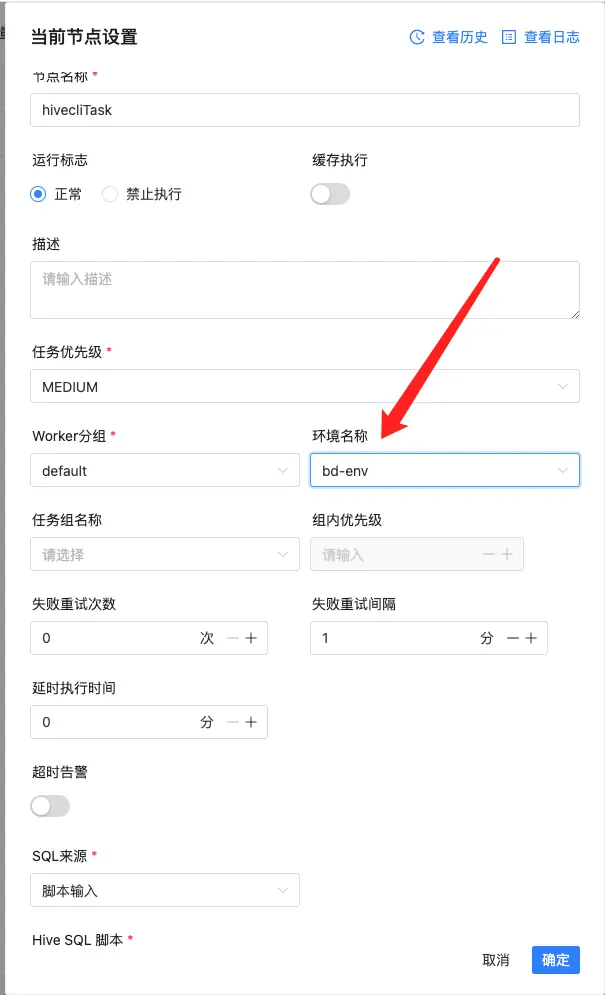
// Set system env // TODO 在这里是设置默认的,其实也是可以设置为 /opt/dolphinscheduler/bin/env/dolphinscheduler_env.sh if (CollectionUtils.isNotEmpty(ShellUtils.ENV_SOURCE_LIST)) { // TODO 这里其实就是向 systemEnvs 中加入ENV_SOURCE_LIST中配置的环境文件的列表 ShellUtils.ENV_SOURCE_LIST.forEach(iShellInterceptorBuilder::appendSystemEnv); } // Set custom env // TODO 设置自定义的env if (StringUtils.isNotBlank(taskRequest.getEnvironmentConfig())) { // TODO 向 customEnvScripts 中加入 iShellInterceptorBuilder.appendCustomEnvScript(taskRequest.getEnvironmentConfig()); }